
Releases
Changelog
Every release, newest first. Versions follow SemVer, and until 1.0 a minor version may still rename a setting or a command. The .vsix for each version is attached to its GitHub release. Porcelain took its identity at 0.7.0 and its name at 0.8.0; the releases before that are the fork's lineage as BranchShift and JetGit Plus, kept below the fold.
0.10.0Latest
Added
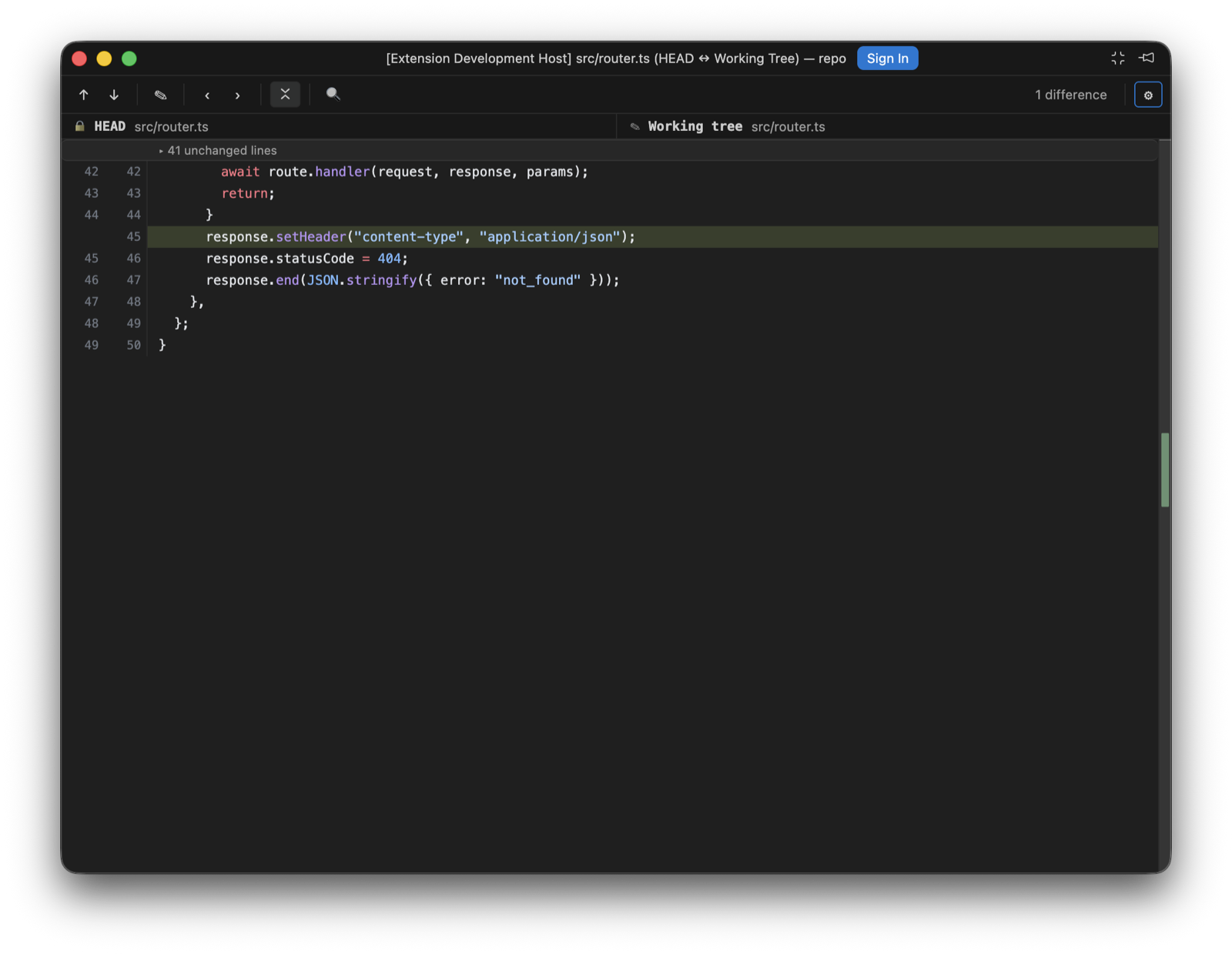
- A caret in every diff pane. the porcelain diff surface now carries a caret on each side, read-only revisions included. It starts on the file's first changed line, moves to wherever you click, and walks with the arrow keys, Home, End and the page keys, in the split panes and the unified view alike. A vertical move steps over a collapsed run and lands on the first visible line past it, the way IntelliJ's caret passes a fold; the run stays collapsed (#3)
- A diff opens on its first change. a first difference below the fold is scrolled into view when the file opens, the way the change stepper would bring it. This happens once per document, so a reload of the diff on screen, quiet or asked for at the banner, keeps both the view and the carets where they were (#3)
- The diff viewer follows
files.autoSave. the editable working-tree side now saves the way the setting says, in all four of its modes:afterDelaywrites once the buffer has been quiet forfiles.autoSaveDelay,onFocusChangewrites when the editor loses focus,onWindowChangewhen the window does, andoffkeeps Cmd+S as the only way to disk. Flipping the setting takes effect in an open diff. Autosave never writes while an IME composition is in flight, and it pauses while the changed-on-disk banner is asking which copy wins; a keystroke typed while a write is in flight stays dirty and goes out with the next save. The dirty dot keeps its meaning and its tooltip names the mode, and a save that fails says so in a banner instead of retrying on its own (#3) - Hover and go to definition in the diff viewer. resting the pointer on a symbol shows the language server's hover, rendered from its markdown the way the editor's own hover widget renders it, with fenced code coloured. Holding Cmd (Ctrl elsewhere) underlines a symbol that has a definition, and a click on it, or F12 from the caret, opens the definition in the native editor, with a pick when there are several; Cmd+K Cmd+I shows the hover at the caret.
editor.hover.enabledandeditor.hover.delayapply. The working tree is asked about as the file on disk, history and index sides through theirporcelain:documents, where the built-in JSON, CSS and HTML servers answer and TypeScript's does not. A side with unsaved edits stays quiet until the next save, and says so once when autosave is off (#3)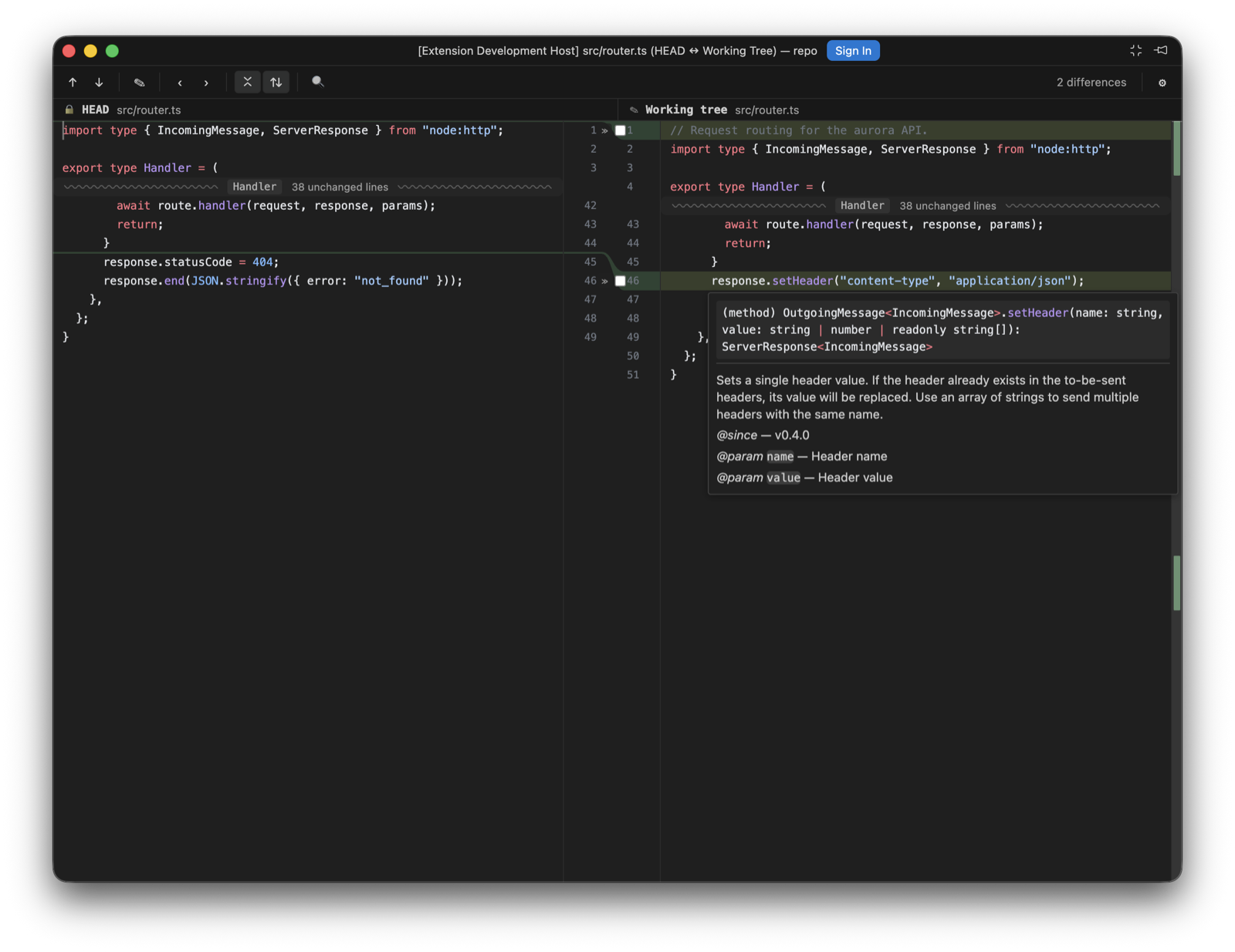
The hover in a diff: the TypeScript server's signature and docs. - Fold rows name their scope. a collapsed run's wavy row now carries the function or class its hidden lines start in, read from the document's symbol outline, ahead of the count, the way IntelliJ labels a fold. The merge editor's rows keep the count alone (#3)
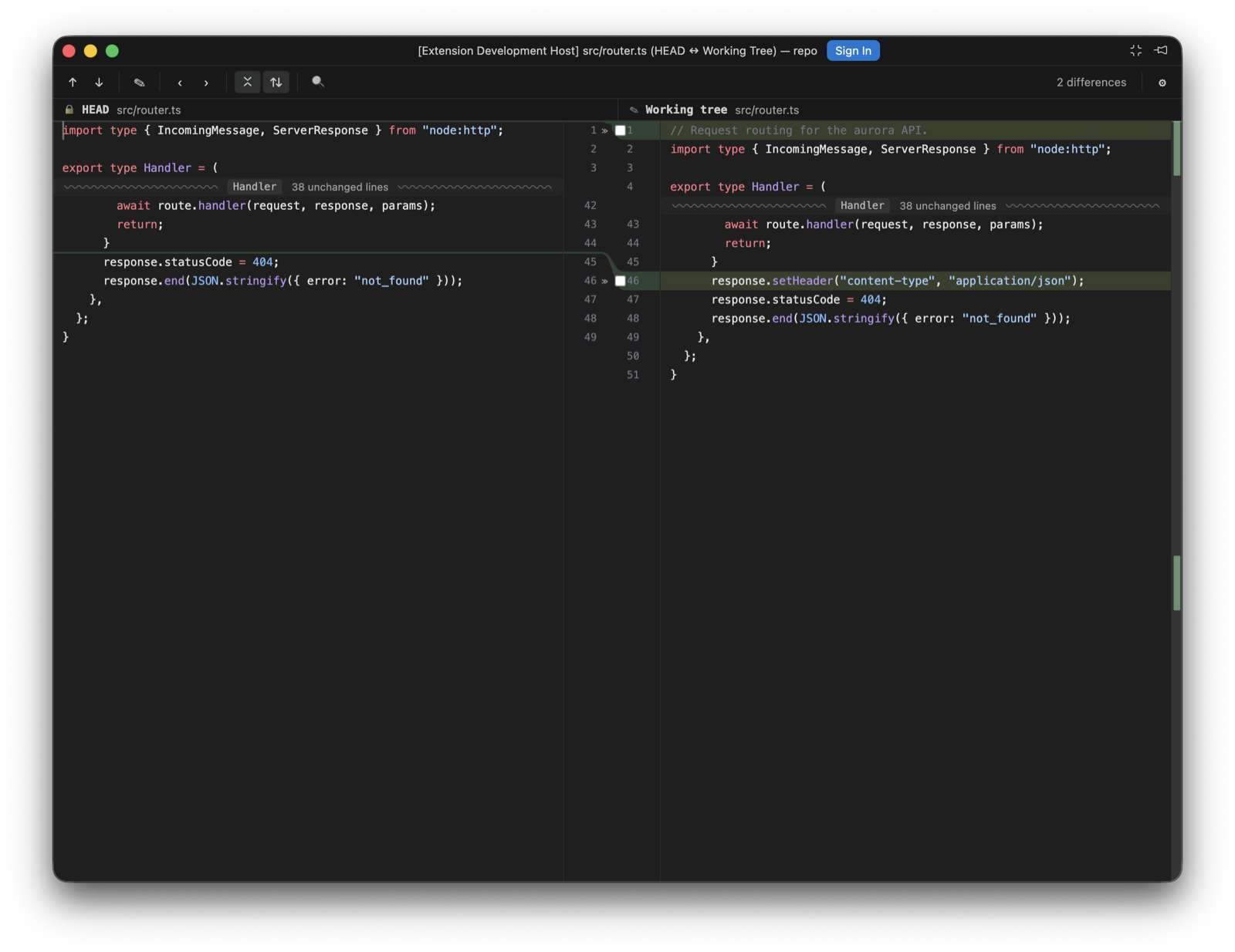
Collapsed runs on both sides, each separator naming the scope its hidden lines start in.
Changed
- Edit Source opens the file at the caret. the button used to open the working file at its top; it now opens on the caret's line and column, and writes any unsaved working-tree edits to disk first, so the line it lands on is the line the diff was showing. When VS Code reloads an already-open document from disk behind that write, the caret is placed again once the reload has landed (#3)
- Unchanged runs open in stages. the fold row in the diff viewer and the merge editor is now a wavy separator carrying the hidden count, and a click opens the run the way IntelliJ does: 4 lines, then 8 more, then the rest, always from the end nearest the caret, so the separator moves away from where you are reading. Hovering the row tints the edge the lines will appear on. A run opening above a visible caret scrolls the view along with it, so the line under the caret stays where it was on screen; a caret off screen is left alone, so a click on a separator never moves what you are looking at. The toolbar's collapse toggle re-collapses partly opened runs along with expanded ones, and a caret caught inside a run moves to the nearest line still on show (#3)
0.9.1
Fixed
- Horizontal scrolling in the diff viewer and merge editor. long lines were cut off at the pane edge with no way to reach the rest. Every pane now scrolls sideways on its own; the two sides stay in lockstep under Synchronise scrolling and snap back together when it is switched on again, and the merge editor's three panes always move as one. The working-tree editor keeps its caret in place while scrolled and follows it on End and Home, find stepping brings a match into view sideways, and the unified view's line numbers and fold labels stay put while the text scrolls under them. Left and Right on the focused diff scroll the pane
- Decoupled scrolling no longer leaks into the shared axis. with Synchronise scrolling off, a wheel over the left pane moved the right pane as well; the left pane now owns both of its axes
Added
- Search modes on the log filter. the commit search gains IntelliJ-style Match Case (
Cc) and Regex (.*) toggles. Search is now literal and case-insensitive by default; it used to be handed togit log --grepraw, which silently treated every query as a case-sensitive regex — searchingf.xmatchedfax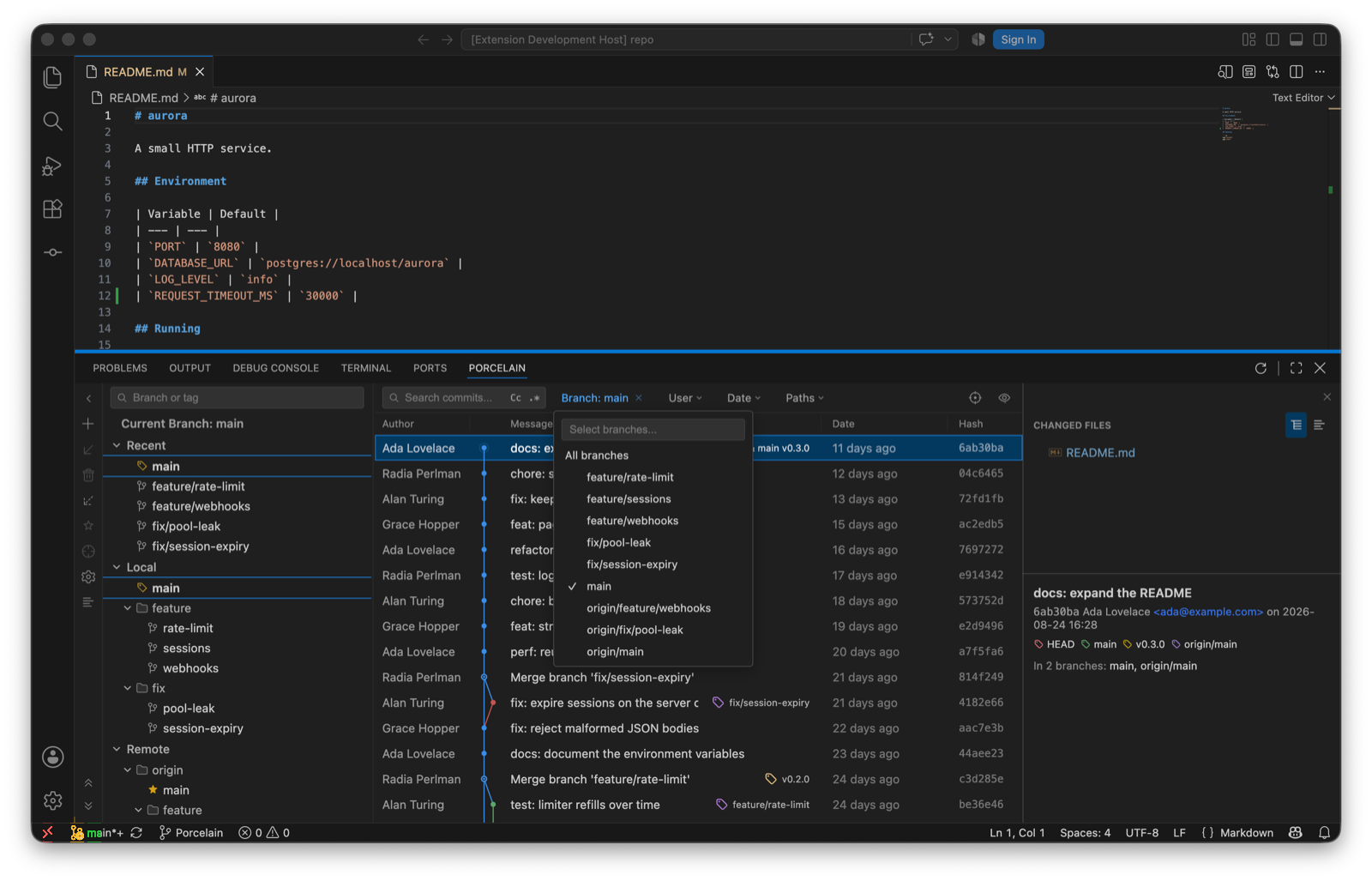
The log toolbar: search with the Cc and .* toggles, and the multi-select Branch filter. - Custom date range. the Date filter's dropdown adds an After/Before date pair alongside the presets, sent to git as inclusive day bounds
- Whole-history author filter. the User dropdown now lists every author in the repository (via
git shortlog), most-commits first, with the configureduser.namepinned to the top as "(me)". It used to offer only authors present in the loaded page - Collapse / Expand Linear Branches. the log's View Options menu can now collapse every collapsible linear run in one action, and expand them all back, matching the per-fragment click collapse
- "In N branches". the details pane for a single selected commit shows which local and remote branches contain it, loaded lazily with Show all / Hide
- Paths filter. a Paths toolbar filter narrows the log to commits touching the given files or folders (one pathspec per line), alongside the file-history chip
- Go to hash / branch / tag. a toolbar action (and ⌘G/Ctrl+G) opens a popup with branch/tag completion; free text resolves as a full or abbreviated commit hash and the log navigates to it, clearing any filters that would hide it
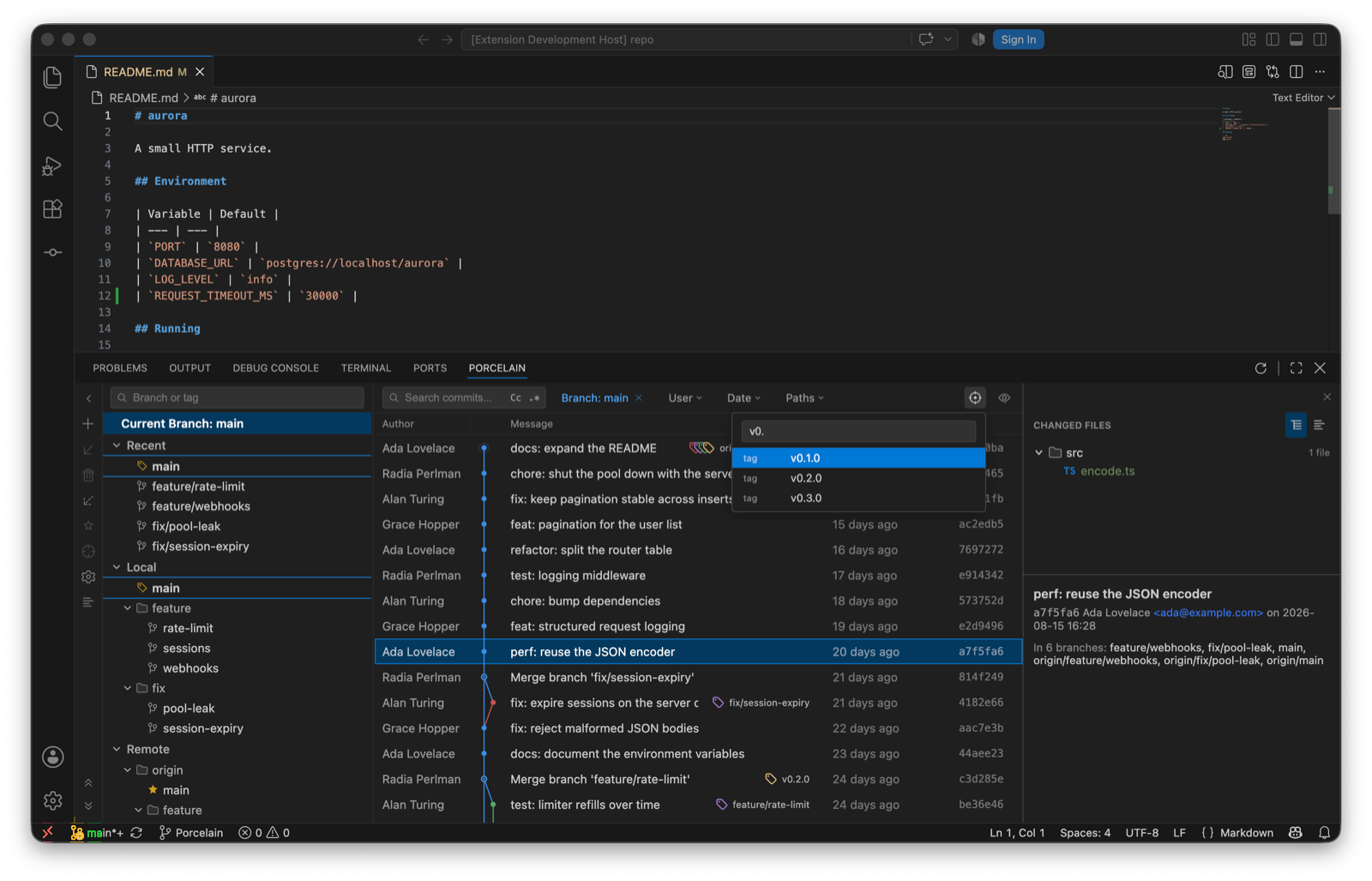
Go to, filtering tags as you type. - Graph modes. View Options gains Sort Topologically, First Parent Only, and No Merge Commits, mapped to git's
--topo-order,--first-parent, and--no-merges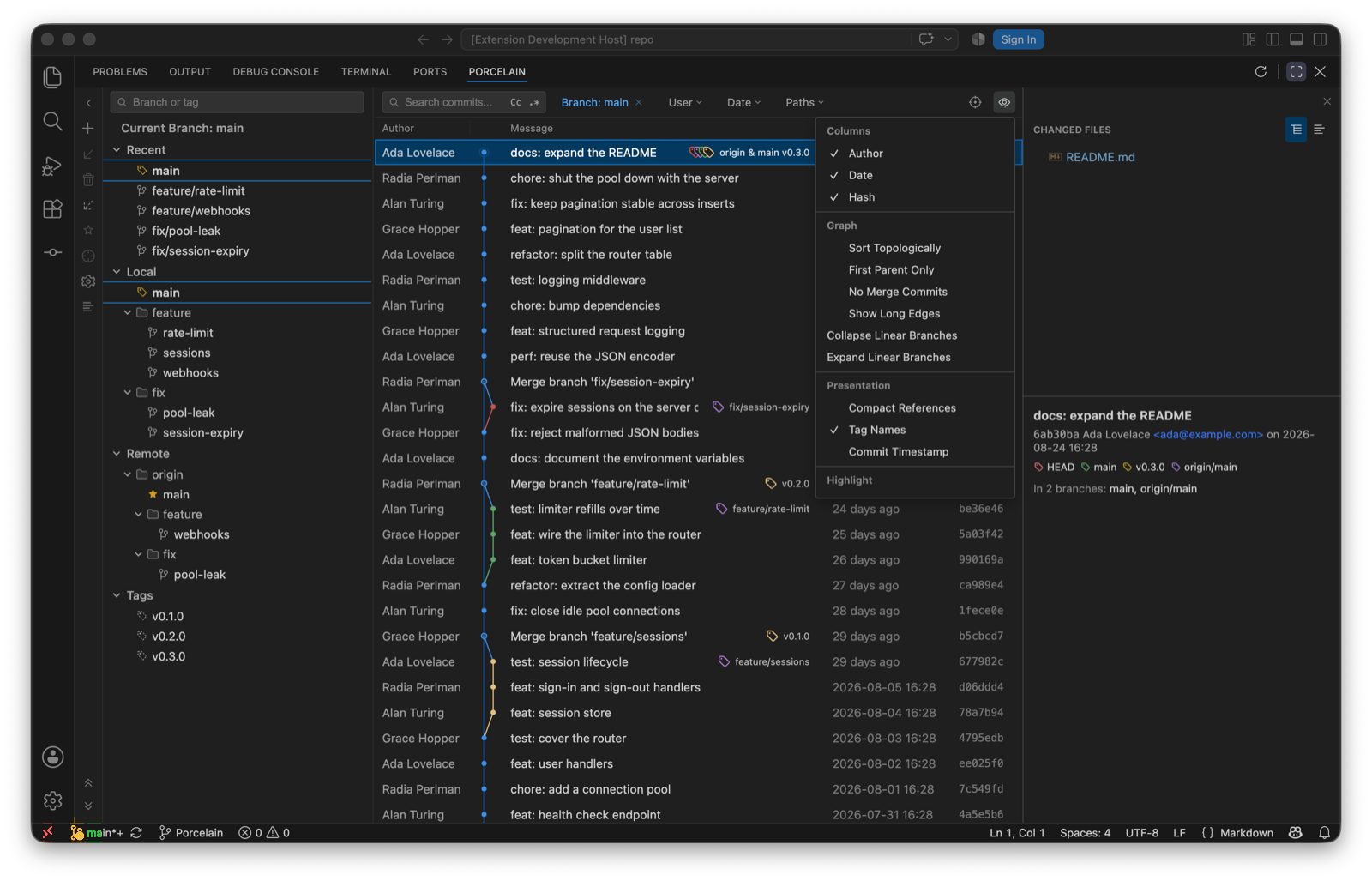
View Options: graph modes, highlighters and presentation toggles. - Long-edge stubs. edges spanning more than 30 rows collapse into a pair of arrow stubs, IntelliJ style; clicking a stub jumps to the edge's other end. "Show Long Edges" restores full drawing
- Highlighters. My Commits (emphasizes commits by the configured
user.name), Dim Merge Commits, and Fade Other Branches (the existing reachability dimming, now toggleable), all persisted - Presentation toggles. Compact References (first label + "+N"), Tag Names on/off, and Commit Timestamp (committer date instead of author date, now carried by the log format)
- Multi-commit cherry-pick. selecting several commits offers "Cherry-Pick N Commits", applied oldest-first in one
git cherry-pickinvocation so the existing conflict banner covers a mid-sequence stop - Worktrees. a Worktrees command lists linked working trees with their branch and state (main, locked, prunable), opens one in a new window, creates one on a new branch, removes one (offering force when git refuses), and prunes records whose directories are gone
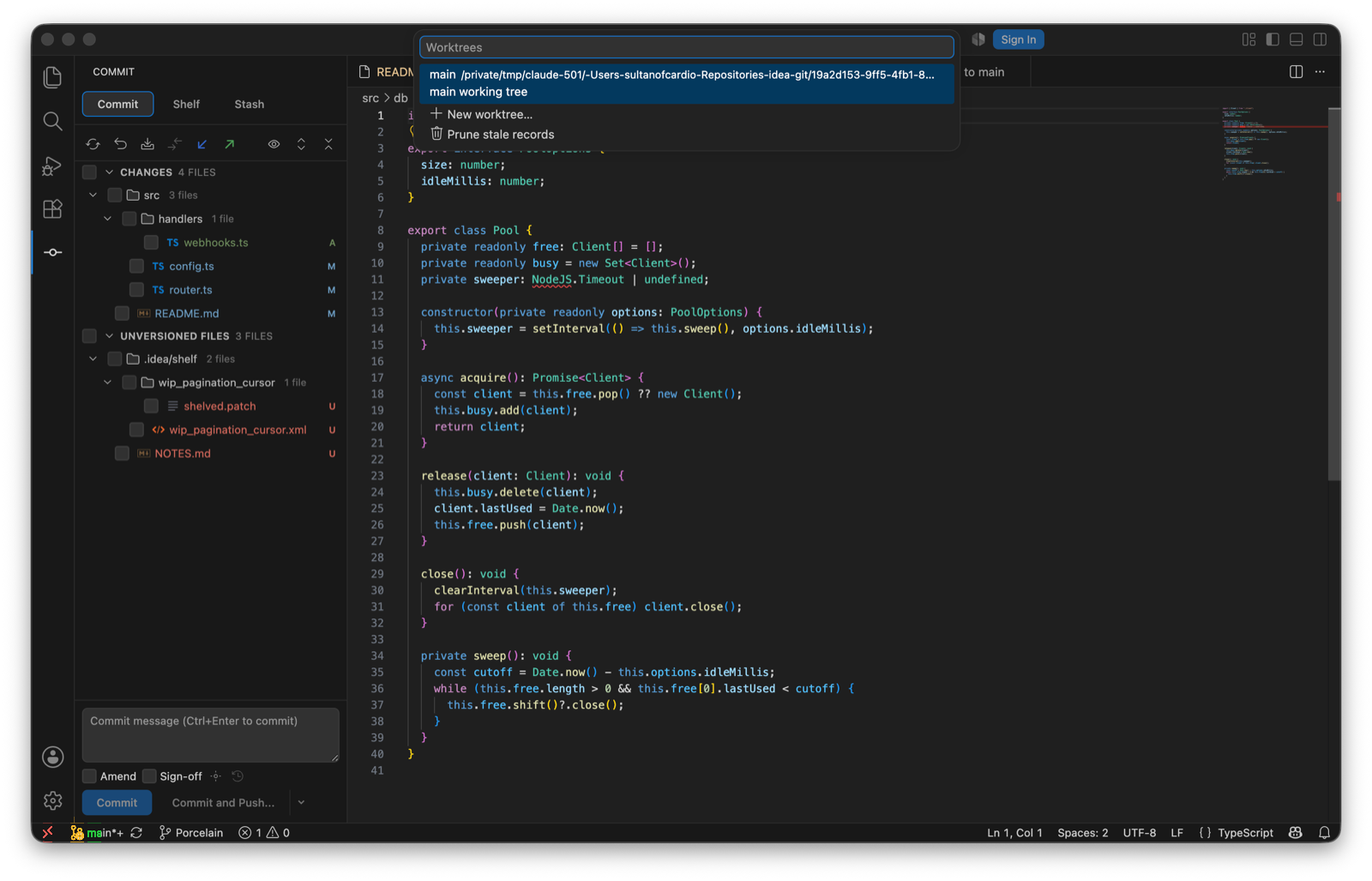
Worktrees…: the list, then New worktree… and Prune stale records. - Git Operations popup. ⌘⌥G / Ctrl+Alt+G opens a quick list of the verbs reached for most: commit, push, update, search commits, blame, resolve conflicts, and worktrees. IntelliJ puts this on Alt+`
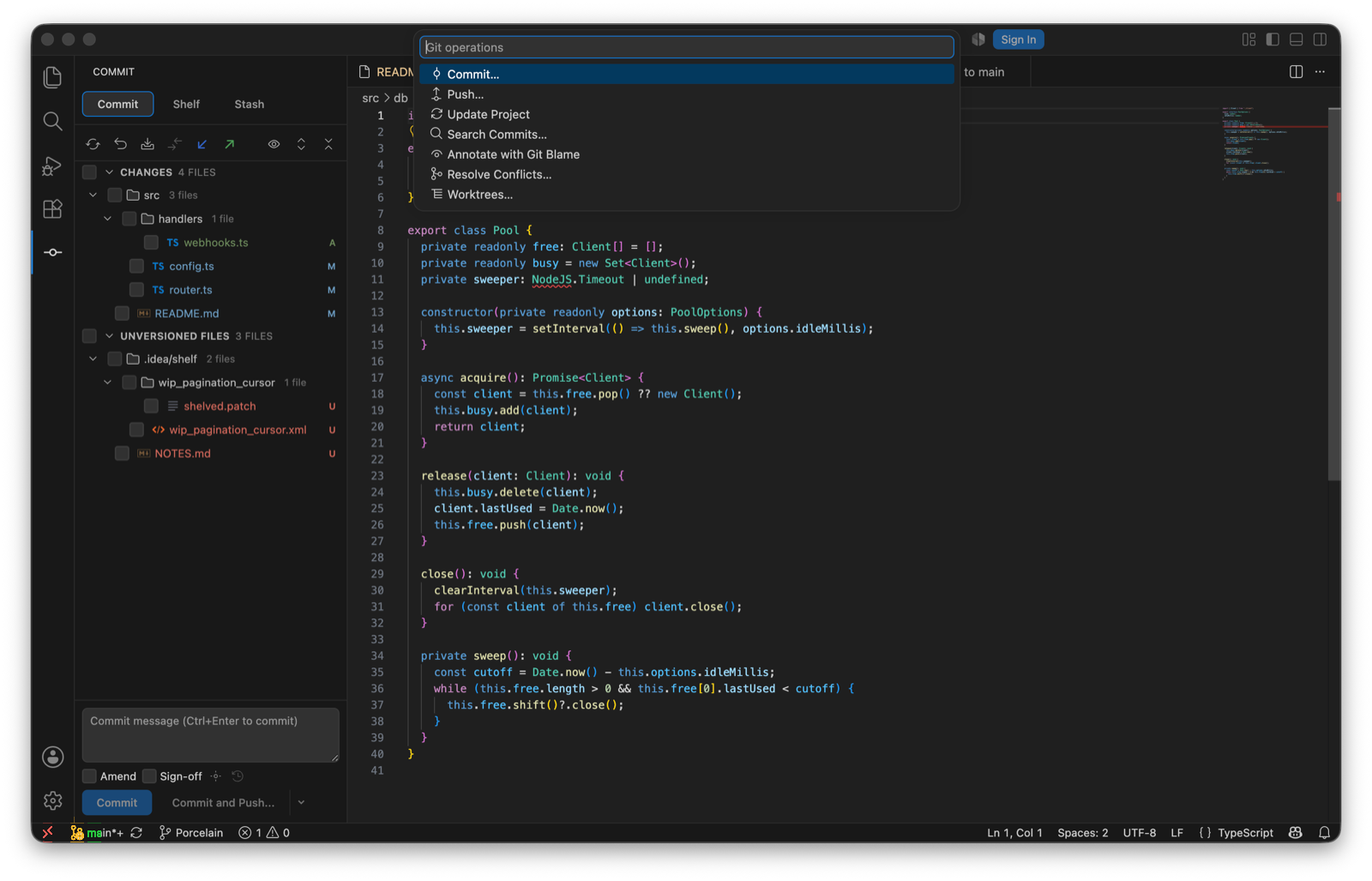
The Git Operations popup. - Search Commits. find a commit by message or by hash from the palette, then copy its revision
- Diff ignore policies. the whitespace menu grows from two options to IntelliJ's four: do not ignore, ignore leading and trailing, ignore whitespaces, and ignore whitespaces and empty lines. The last two compare normalized copies of both sides, so re-indenting and re-wrapping stop reading as changes while the chunks still address the real lines
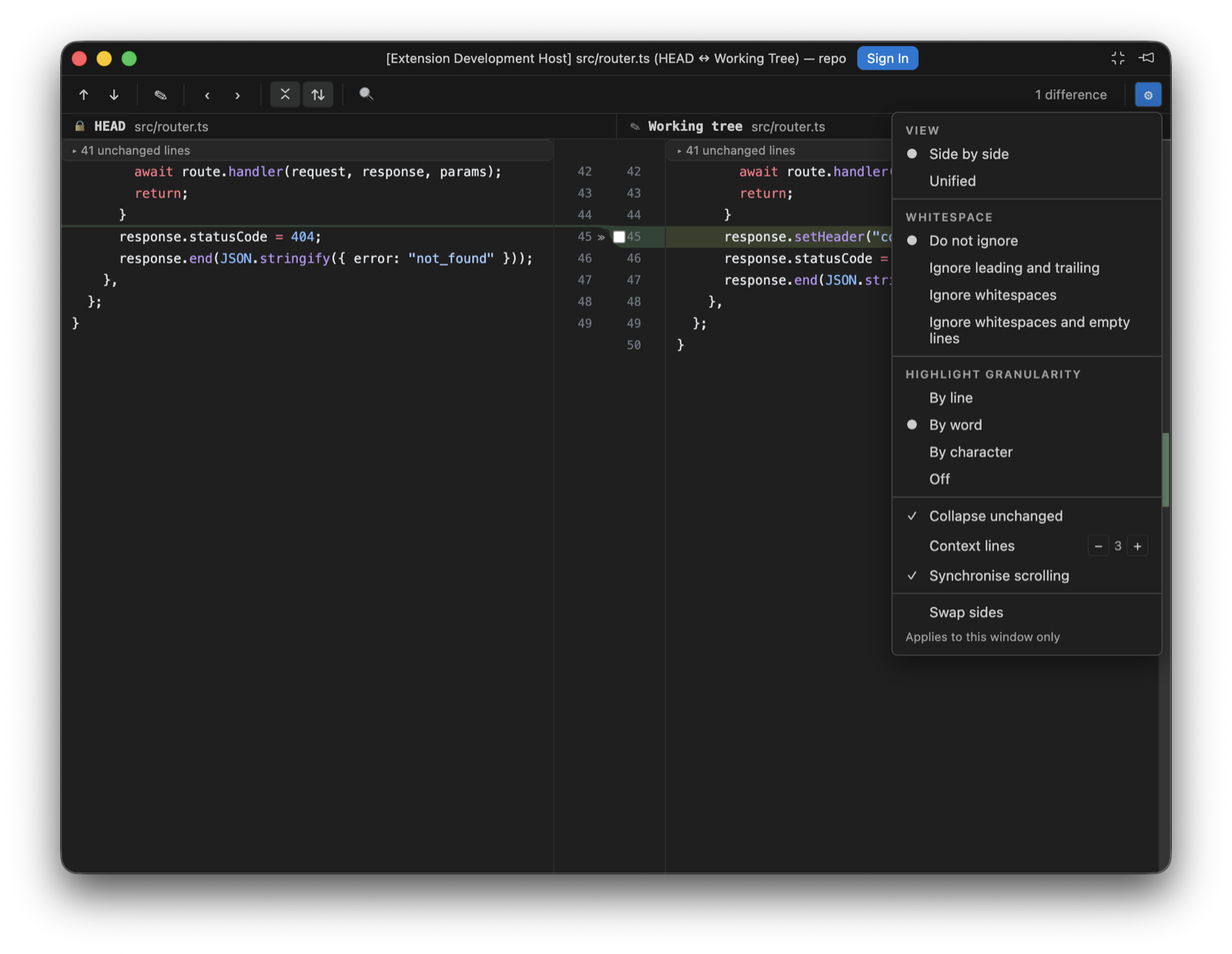
The diff settings menu, with the four whitespace policies. - Apply non-conflicting changes and Resolve automatically. two merge-toolbar actions. The first takes every region only one side actually changed, which loses nothing by definition. The second combines both sides wherever their edits touch different base lines, and deliberately leaves anything overlapping for you: a region where both sides rewrote the same line is never auto-merged
- Blame. "Annotate with Git Blame" in the editor context menu draws an author-and-date column beside every line, with a hover carrying the commit's subject, author, date, and short hash. Blame Options chooses how lines are coloured (by age, by author, or not at all), how names are written (initials, full name, or email), whether whitespace-only changes are ignored, and whether moved lines are followed within a file or across files. Uncommitted lines are marked as such rather than attributed to anyone
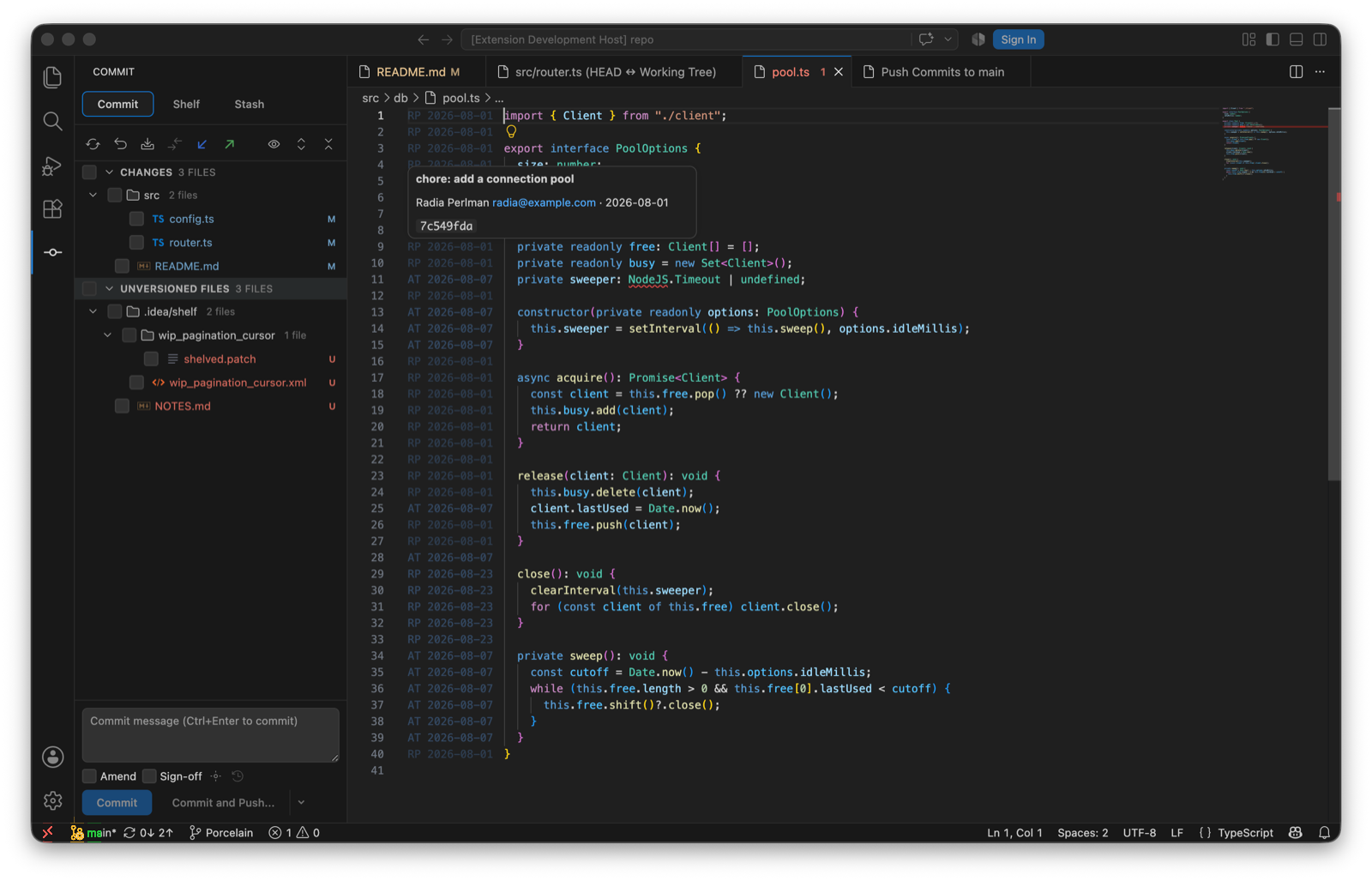
Annotate with Git Blame: initials and date per line, shaded by age, and the hover card. - Protected branches.
porcelain.push.protectedBranches(regular expressions, defaulting tomainandmaster) refuses a force push outright instead of confirming it. Force push already used--force-with-lease, which declines when the remote moved in a way porcelain has not seen; the protected list is the guard in front of that - Update Project. one action that fetches and then brings the current branch up to date by merge or rebase, per
porcelain.update.method, carrying uncommitted work across with an autostash and reporting the commits that arrived.porcelain.fetch.tagschooses whether tags come along - Push options and sync counts. set upstream while pushing a new branch, push tags, and skip pre-push hooks; incoming and outgoing counts per branch are read from already-fetched refs, so they cost no network round-trip
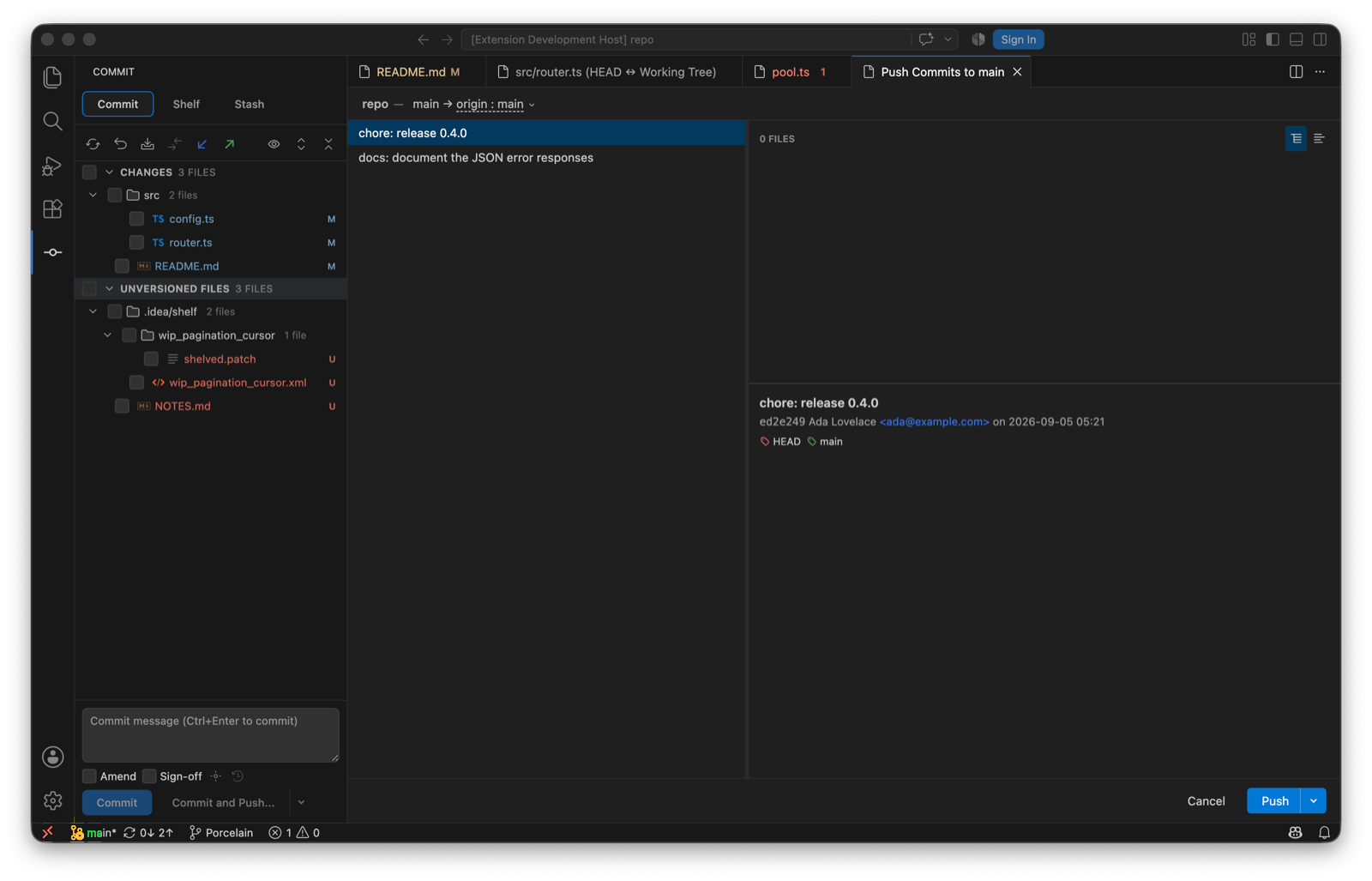
The push panel, with the options under the Push dropdown. - Per-hunk staging. individual hunks can be staged and unstaged: porcelain parses the file's diff, rebuilds a patch from just the chosen hunks (renumbering the ones that follow a skipped hunk), and lets git apply it with context still verified, so a file that changed underneath refuses rather than applying in the wrong place. A change can also be addressed by its line range rather than by hunk, which is how the diff surface reaches exactly the block pointed at: git merges changes closer together than its context width into one hunk, so addressing by hunk would take neighbouring blocks with it
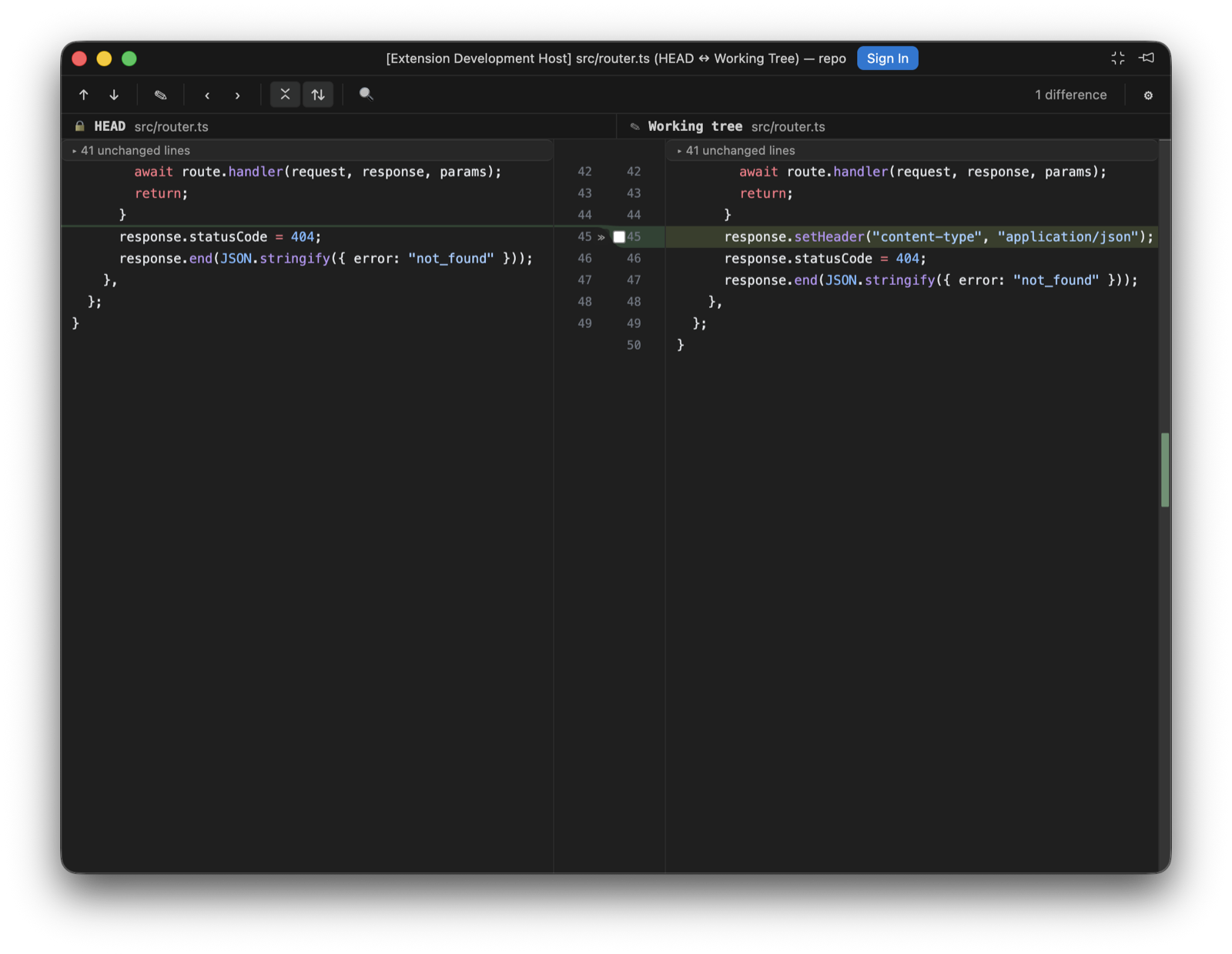
A working-tree diff from the Commit view: the gutter checkbox is the hunk's inclusion. - Commit options. Sign-off beside Amend, plus a commit-options panel with Skip commit hooks and an Author override (rejected before reaching git if it looks like an option). An empty commit message is seeded from
commit.template, or from git's ownMERGE_MSGwhile a merge is in progress - Stash options and .gitignore. stash with keep-index, include-untracked, and a message; turn a stash into a branch; and add a path to
.gitignorewithout duplicating an entry that is already there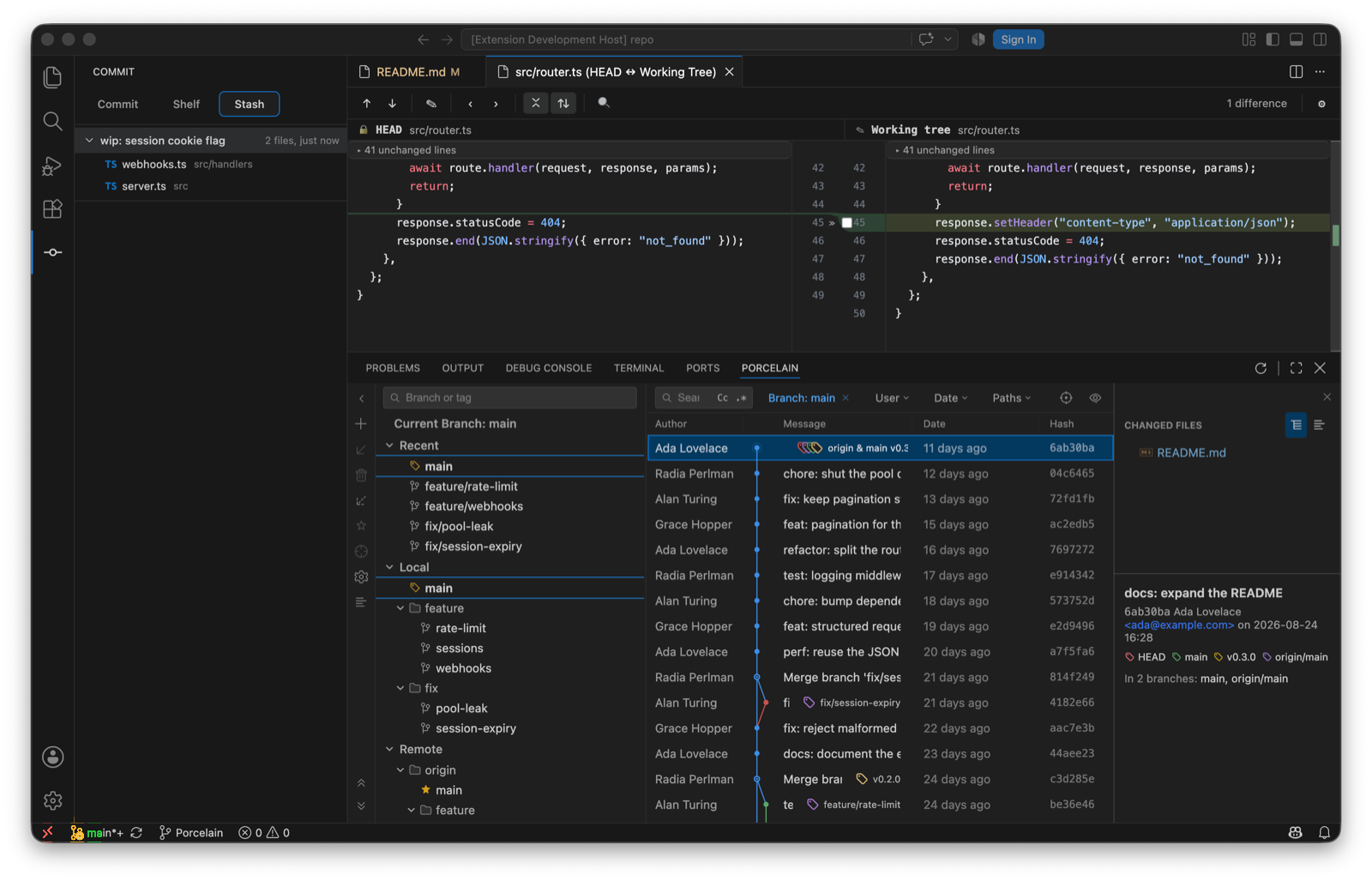
The Stash tab. - Interactive rebase editor. "Interactively Rebase from Here..." on a commit opens a Rebasing Commits table: pick / reword / stop-to-edit / squash / fixup / drop per commit, inline message editing for reword and squash, move up/down to reorder, Reset to restore the loaded plan, and View Git Commands to read the exact
git-rebase-todobefore starting. Porcelain drives realgit rebase -ithroughGIT_SEQUENCE_EDITOR, so hooks, rerere, and the merge machinery behave exactly as git intends; a conflict stops in the existing continue/abort/skip banner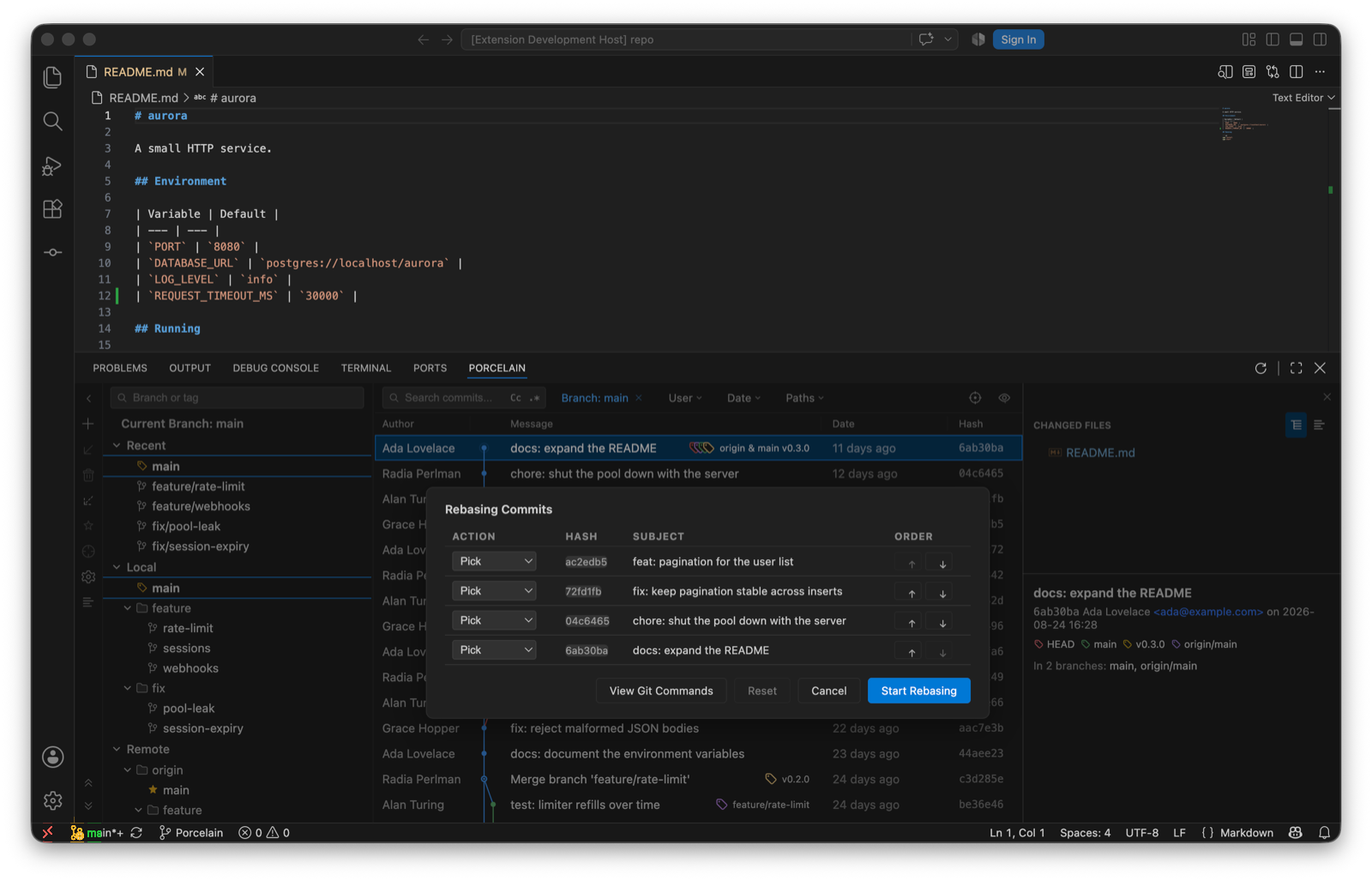
Rebasing Commits. - Reword, Squash, Fixup, Undo Commit. edit any commit's message (an amend at HEAD, a reword rebase below it), fold a multi-selection into one commit under a combined message, commit the working tree as a
fixup!of a chosen commit, and undo the tip commit while keeping its changes staged. All are disabled while another Git operation is in progress, with the reason shown - Branch and tag verbs. smart checkout (stash → switch → restore) when local changes block a swap, force-delete that first names the commits it would discard, reset-to-upstream on the checked-out branch, and a Recent section in the branch tree read from the reflog. Tags gain Checkout, Push Tag, Delete Tag, and Delete Tag on Remote, with the remote-bound pair disabled when the repository has no remote
- Manage Remotes. a Name/URL table for adding, renaming, re-pointing, and removing remotes, reachable from the branch pane's settings menu. Remote names and URLs that look like git options are rejected before they reach the command line
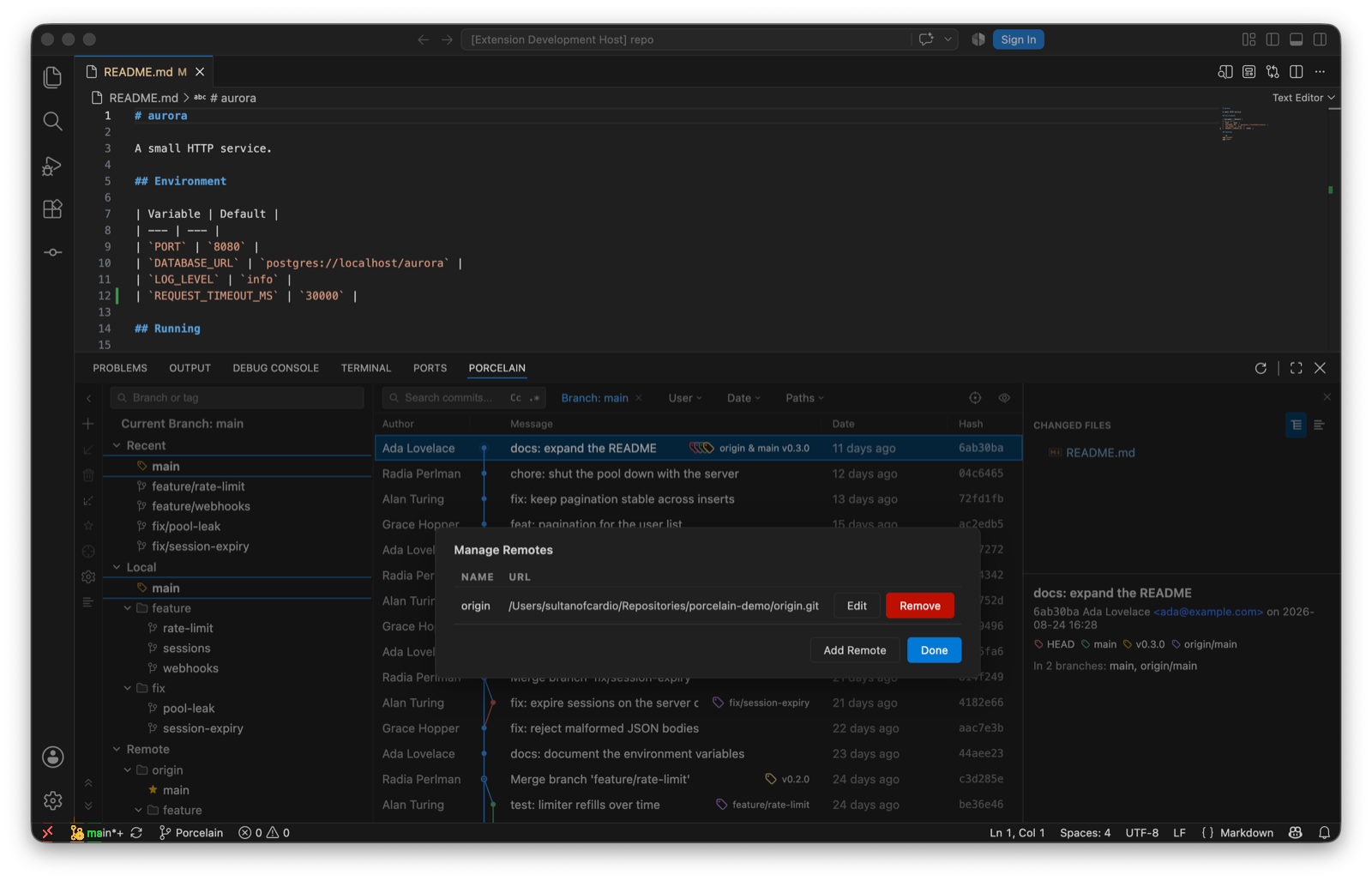
Manage Remotes. - Clean Up Branches. a table of local branches with last-commit date, tracked branch, and merge status, filtered by a directory-style prefix; merged branches are pre-selected and unmerged ones are only ever deleted with an explicit, counted force
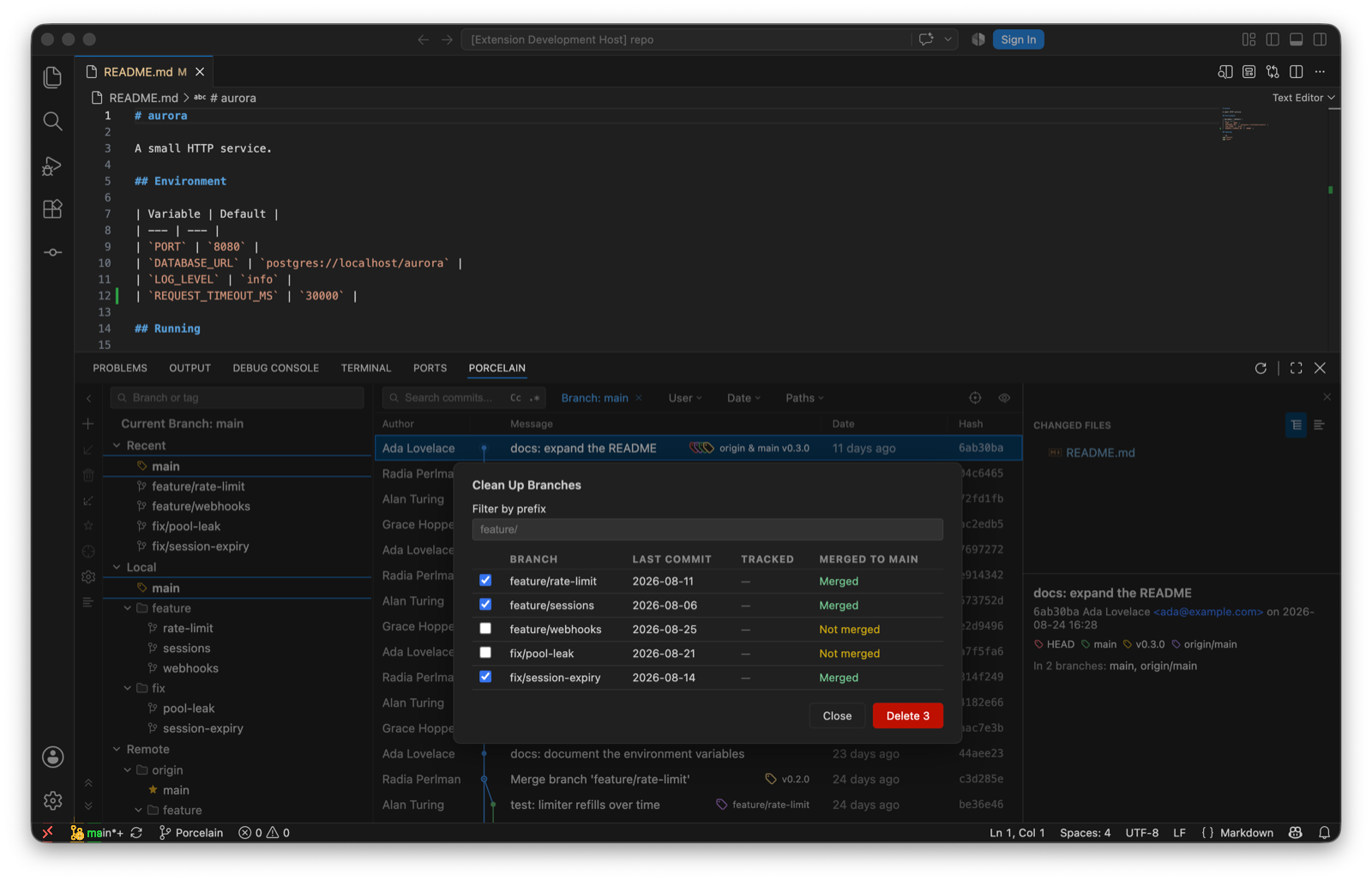
Clean Up Branches, merged branches pre-selected. - Multi-branch filter. the Branch filter is now multi-select: the dropdown stays open while combining branches with checkboxes, and the log shows the union of everything reachable from the chosen refs, IntelliJ style. A plain click in the branch tree still replaces the filter with that one ref
The Branch filter stays open while you tick branches. - Porcelain diff viewer. an optional JetBrains-style diff surface rendered in a webview, behind
porcelain.diff.viewer. Paired centre gutter with each side's own line numbers, curved Bézier connectors between changed regions, per-side revision headers, a live difference count, a change stripe with click-to-jump, and a settings menu whose options apply to that window only and are forgotten when it closes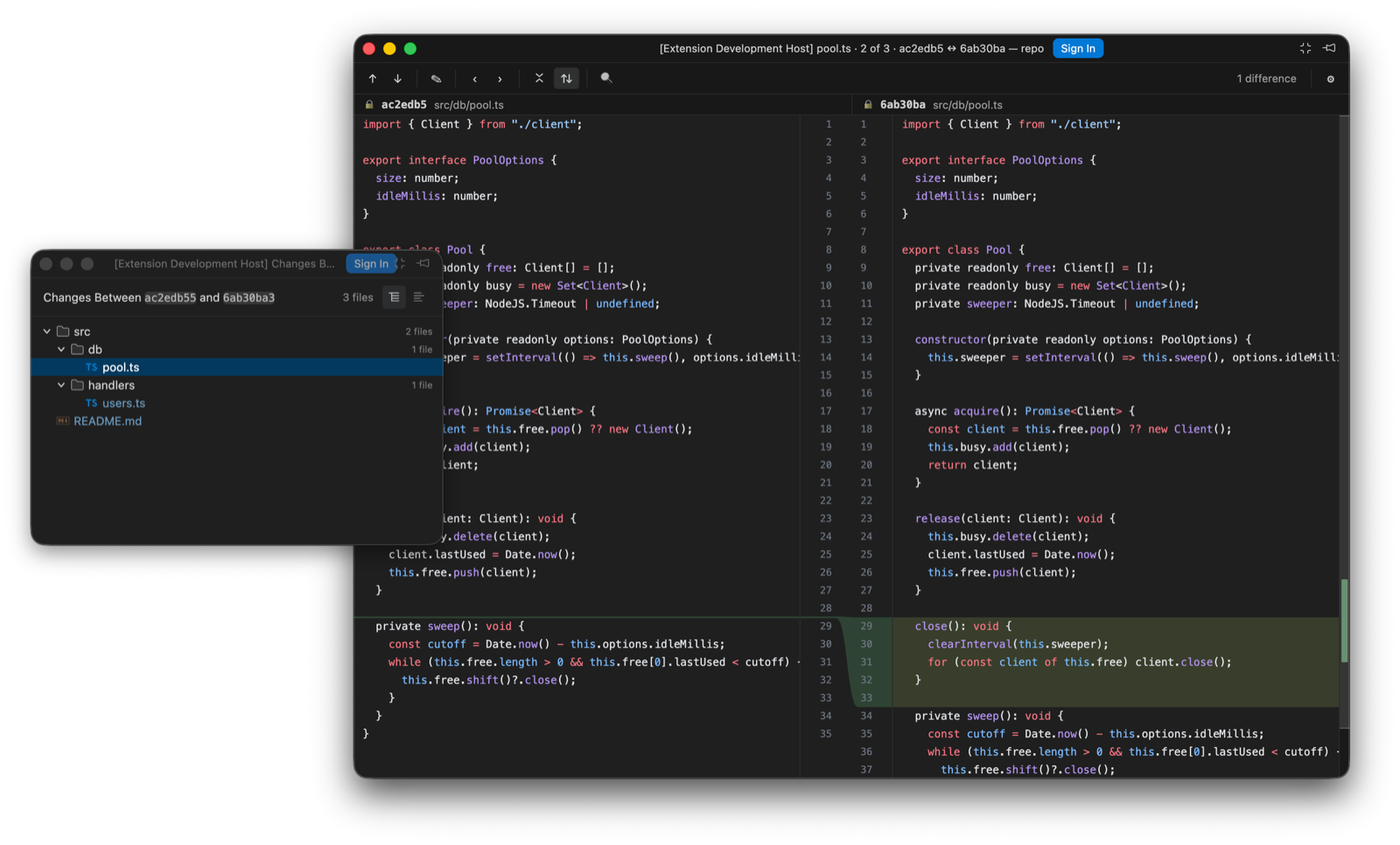
The diff viewer in its own window, beside the Changes window. - Per-window diff options. ignore whitespace, highlight granularity (line / word / character / off), collapse unchanged fragments and synchronised scrolling. VS Code's
diffEditor.*equivalents are global settings, so these have no native counterpart - Unified view. the settings menu can switch the diff from side-by-side to a single-column unified layout: old lines then new lines for each change, folds and find included. Modified lines keep their modified colouring on both halves rather than posing as removed/added — an edited line is not an addition. Sync-scroll controls hide in unified mode (one column has nothing to synchronise), and single-file layouts for added or deleted files ignore the toggle
The unified layout.
Changed
- 3-way merge editor rebuilt on the diff stack. the merge editor is now three Porcelain diff panes on one shared scroll axis, in the IDEA order: yours on the left, the editable result in the middle, theirs on the right.
node-diff3runs once to seed the result buffer and the conflict regions; every accept, revert or keystroke after that is a splice into the result followed by a re-derive of the two live pair diffs. The verbs ride the gutter connectors — accept (≫/≪), ignore, revert to base, with accept-both reachable IntelliJ-style — the result pane is a real editor built from scratch — click anywhere and type, with selection, clipboard, IME composition and word movement, and typing inside a conflict resolves it — and a single undo/redo timeline covering typed edits and gutter verbs alike, conflict stepping, collapse of unchanged regions and per-pane find come with the shared stack. Conflict colouring follows each side's own state rather than the live diff, in every decision state: a still-takeable side stays red with its connector tapering to the exact row an accept would splice at, while a side that landed — or a conflict resolved by typing — goes quietly green. Apply stays disabled until every conflict is resolved. The legacy merge editor is replaced outright; unlike the diff viewer, this is not gated byporcelain.diff.viewer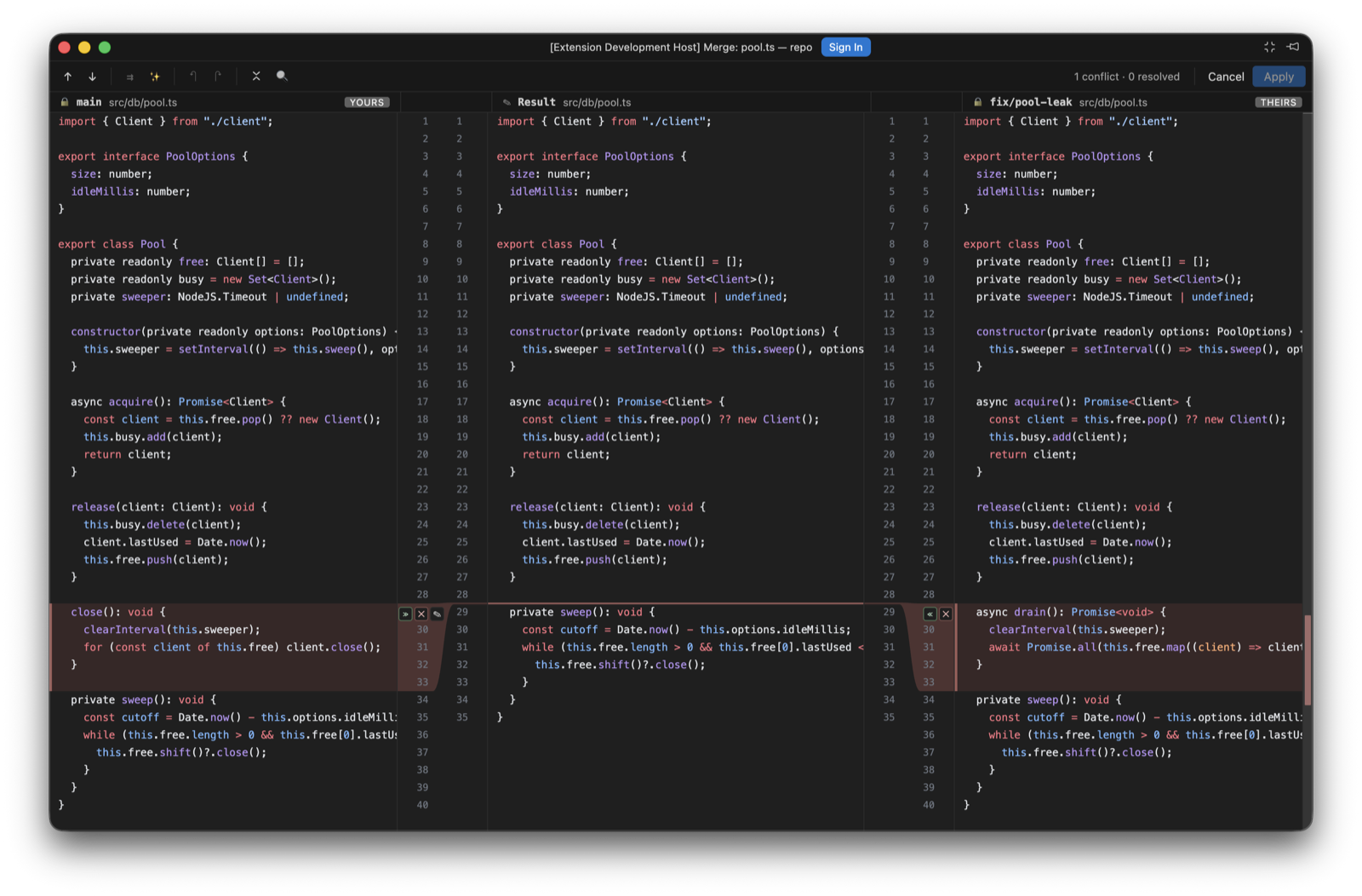
Yours, Result, Theirs, with the verbs on the gutter connectors. - Diff titles carry position and both revisions. a diff is now titled
panel-store.ts · 3 of 7 · 07748ba ↔ af89dd2. File-stepper position used to be reported through a transient status-bar message, which the compact floating diff window never shows Next File Diff/Previous File Diffrenamed toNext File/Previous File
Fixed
- Independent scrolling when synchronised scrolling is off. the left pane was pinned to the top of the file, so only the right side ever moved. Each pane now scrolls on its own, seeded from wherever it already was so switching the toggle never makes the view jump
- A stalled pane holds its anchor mid-window. scrolling through a large insertion froze the other side with the insertion point at the very top, pushing every line before it off screen. The stalled side is now lifted so its anchor sits in the middle of the pane, easing in and out at the edges of the gap, the way IntelliJ does it
- The merge Result pane shows zero-height conflicts. when both sides add where the base had nothing, the region occupies no rows in the result, so neither the row colouring nor the pair-diff anchors had anything to draw and the middle pane showed nothing at all. The region now draws its own rule straight through the result, in its own colour
- Dead palette commands removed. five
porcelain.commitPanel.*commands were declared but never registered, so they appeared in the Command Palette and failed when invoked - Refresh icon has a home. the Git Log view's title menu was an empty contribution, leaving the declared refresh action unreachable
- Branch and tag names no longer truncated in diff titles. the title shortened every ref with a blind
substring(0, 7), turningfeature/long-nameintofeature. Only actual object names are abbreviated now - Unsupported languages are no longer highlighted as TypeScript. the merge editor fell back to TypeScript's grammar for anything outside the six Shiki loads, colouring Go, Python and YAML with confidently wrong rules. The diff viewer and the rebuilt merge editor fall back to plain text instead
Notes
- The Porcelain diff viewer is now the default;
porcelain.diff.viewer: nativerestores VS Code's own diff editor. Working-tree diffs route to the Porcelain viewer too — the working-tree side is a real editor built on the same core as the merge result pane (click anywhere and type, with selection, clipboard, IME composition and one coalescing undo/redo timeline), and Cmd+S/Ctrl+S saves to disk (a dirty dot marks unsaved edits, and a banner offers reload-or-keep if the file changes on disk underneath). Index and historical sides stay read-only, and Edit Source remains the way to the real file. Binary and image diffs and very large text diffs show an in-viewer placeholder with an Open in editor action (images up to 10 MB per side render side by side, heavier ones degrade to the placeholder with both sizes; oversized text offers Show anyway). Find, keyboard navigation and the screen-reader story are all in place
0.8.0Rename
Changed
- Renamed to Porcelain. the extension ID is now
sultanofcardio.porcelain, commands areporcelain.*, the setting isporcelain.diff.openIn, and the content URI scheme isporcelain:. Named for Git's own word for the user-facing layer over its plumbing, and chosen to carry no implication of affiliation with JetBrains - New icon. the mark is now a P drawn as a branch leaving the trunk and merging back, with a commit node at the merge
Added
- Third-party notices.
THIRD-PARTY-NOTICES.mdships in the package, carrying the Apache 2.0 notice for the bundled JetBrains icons, the CC BY 4.0 attribution for Codicons, and the license text of all 59 bundled npm packages
0.7.0Rename
Added
- Compare Versions. selecting two commits in the Git Log and right-clicking now offers Compare Versions, showing the net difference between the two snapshots, ordered oldest to newest whichever way they were selected
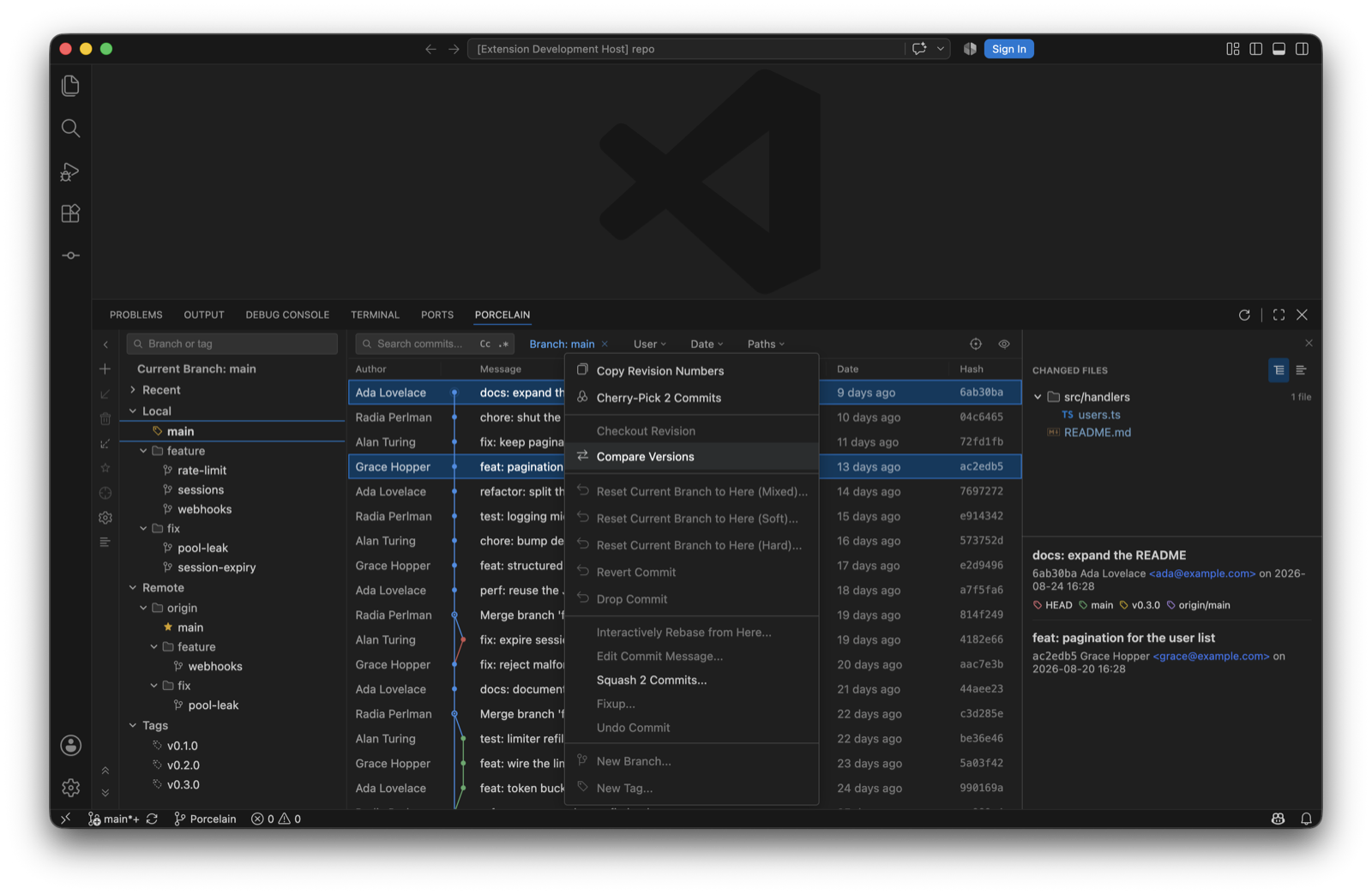
Compare Versions with two commits selected. - Floating diff windows. diffs and comparison file lists open in detached windows, with a single diff window reused for every file;
ideaGit.diff.openInswitches back to editor tabsThe Changes window and the diff window, detached.
Changed
- IDEA Git rebrand. the fork is renamed from BranchShift to IDEA Git, moving the extension ID to
sultanofcardio.idea-git, commands toideaGit.*, and the content URI scheme toidea-git:. Keybindings bound tobranchshift.*need repointing - Single-commit actions during multi-selection. reset, revert, drop, checkout, cherry-pick, and branch/tag creation are disabled while several commits are selected, since the right-clicked row is not an obvious target
- Minimum editor version. requires VS Code 1.86 for detached windows
Before Porcelain: BranchShift and JetGit Plus, 0.0.4 to 0.6.4 (47 releases)
The fork's lineage, English halves of the bilingual entries. Kept because the code is still here.
0.6.4
Changed
- Branch dashboard responsibilities. split branch-tree modeling, state, presentation, and actions into focused modules with regression coverage
- Stable tree presentation. made grouped and flat views derive consistently while restoring manual directory collapse state after mode and search changes
- Repository-bound deferred actions. branch menus and dialogs retain the repository where each action originated, including after repository switches
Fixed
- Accurate branch action feedback. action availability reflects upstream and branch state, while mutation failures report the relevant cause without stale messages
0.6.3
Changed
- Publisher migration. moved the public repository and Marketplace identity to VitalHex and prepared the first
vitalhex.branchshiftpackage
0.6.2
Fixed
- Git command reliability. centralized command execution, bounded output handling, typed failures, and consistent streaming behavior
- Branch tree stability. normalized refs before rebuilding the branch tree, filtered symbolic remote defaults correctly, and preserved folding state across presentation changes
- Special-path handling. preserved spaces, Unicode, rename endpoints, and special characters across working-tree status, diffs, and content URIs
- Index and shelf safety. protected the index during selected operations, preserved unrelated staged changes, and rejected unsafe shelf mutations before changing repository state
- Repository-bound request ordering. discarded stale responses, coalesced refresh bursts, and cleared repository-scoped UI state before loading a newly selected repository
- Commit and Push correctness. split commit state responsibilities, made staged/unstaged diff boundaries explicit, and prevented stale Push selections from crossing repository switches
- Host verification and missing refs. restored desktop host test execution with current application bundles and kept unavailable refs on the expected non-error path
0.6.1
Fixed
- Owned README media. removed inherited demo GIFs and screenshots from the BranchShift README and release package. New product media will be captured from BranchShift builds instead of reusing the original fork's assets
0.6.0
Changed
- BranchShift rebrand. renamed the public product from JetGit Plus to BranchShift, with a new original icon, Marketplace metadata, bilingual README, and migration-focused positioning: “Switch editors, not your Git workflow.”
- Complete identity reset. package name, extension ID, commands, views, URI scheme, workspace state keys, diagnostics, and internal error types now use
branchshift - Marketplace discovery. expanded Git, SCM, JetBrains, branch comparison, file history, multi-repo, VS Code, and Cursor keywords; added Visualization category and gallery metadata
- Package hygiene. development metadata, SDD artifacts, local IDE files, ROADMAP, and previously built VSIX files are excluded from release packages
Breaking
- The extension ID changes from
strNewBee.jetgit-plustostrNewBee.branchshift. Existing JetGit Plus workspace state is intentionally not migrated; uninstall the old development VSIX before installing BranchShift
0.5.3
Changed
- Commit-state styling. selected, hovered, and current-branch-highlighted commit rows now remain visually distinct, including a visible selection outline
- Changed Files tree polish. added directory chevrons, whole-row expand/collapse, consistent file highlighting, and corrected nested indentation
- Commit metadata alignment. ref, author, date, and hash columns share a stable grid and remain aligned across highlighted rows
Fixed
- Commit panel file selection. double-clicking a changed file no longer leaves browser word selection in place
- Ordinary log hover visibility. non-highlighted and current-branch-highlighted rows now both provide a visible hover state
0.5.2
Added
- Compare with Current. local branches, remote branches, and tags can open repository-bound comparison editor tabs; each ordered ref pair keeps its own session-only tab
- Bidirectional comparison logs. the upper log shows commits unique to the selected ref and the lower log shows commits unique to the current ref; both sides have independent Search, User, Date, Path, pagination, selection, changed files, and commit details
Changed
- Current-branch reachability background. the ordinary Git Log uses a theme-aware blue background for commits reachable from the checked-out branch, with selected and hover states taking precedence
- Shared commit actions. ordinary and comparison logs use the same repository-bound commit action registry, so future actions can be added once for both surfaces
Fixed
- Repository-safe comparison refresh. comparison tabs ignore other repositories, coalesce short watcher bursts, preserve valid selections across refreshes, and keep detached comparisons pinned to the commit captured at creation
0.5.1
Added
- Persistent branch and tag favorites. local branches, remote branches, and tags can be marked/unmarked from the tree, context menu, or sidebar; favorites are stored per workspace and repository and sorted first
- Branch dashboard preferences. "Show Tags" and the single-click action (filter the log or navigate to the ref head) are now functional workspace preferences
- Typed ref selection and navigation. branch and tag selections no longer collide when names match; navigating to a ref head loads older log pages when necessary and scrolls the virtualized list to the commit
Fixed
- Branch Update semantics. current branches update from their configured upstream; non-current local branches fast-forward through a safe fetch refspec without switching or modifying the working tree. Missing upstreams, non-fast-forward updates, and branches checked out in another worktree now produce explicit errors
- Long commit tooltip flicker. tooltip placement is now deterministic, viewport-clamped, and wrapped; commit-subject tooltips only appear for truncated text
- Removed inert branch actions. removed the non-functional "Show My Branches" entry and replaced placeholder Favorite/Show Tags/single-click handlers with real stateful behavior
0.5.0
Removed
- "Compare with Current" branch button. temporarily removed the "Compare with Current" action from the Branch sidebar. It constructed invalid
jetgit-plus:/diff URIs (the branch name was used directly as the URI path, with no?ref=and no?repo=), soGitContentProvidercould never resolve real file content for either side and the diff was always empty; after a multi-repo switch the bare URIs also resolved against the wrong repo. It can be restored from this commit; when re-added it must build the diff URIs withbuildGitContentUri(ref, filePath, repoId)(i.e. carry?ref=and?repo=), the same way the other diff handlers (e.g.showIdeaShelfFileDiff) already do. See theTODO(future)comment inBranchSidebar.tsx
Fixed
- Shelf diff URIs now tagged with
repo=.showIdeaShelfFileDiffnow stamps&repo=<repoId>on bothjetgit-plus:/shelved/...diff URIs (base and modified). Previously they carried only?ref=, so after switching repos the URIs resolved against the wrong repo via the active-repo fallback; the diff content was silently served from (or failed to resolve in) the wrong repository
Changed
- Identity independence. rebranded as independent extension "JetGit Plus": all
git-brainsidentifiers (commands, views, view containers, URI scheme) renamed tojetgit-plus; publisher changed tostrNewBee; extension ID is nowstrNewBee.jetgit-plus. The extension can now be installed alongside the upstream version without conflict - Version 0.5.0. starting version line for the independent fork
- License. added contributor copyright notice
0.4.17
Added
- Push Panel: multi-remote switching. push panel now supports switching between multiple remotes (e.g. origin, fork) via a dropdown selector, with separate branch input
Fixed
- Push Panel: stale remote list. uses
git remotedirectly; deleted remotes no longer appear - Push Panel: default remote detection. auto-detects correct default remote from upstream tracking config
- Push Panel: ahead commits respect selected remote. commit list updates dynamically when switching remotes
- Dark theme: commit panel. fixed tabs, toolbar buttons, textarea border, checkboxes, buttons (Cancel/Commit and Push) all using hardcoded light colors
- Dark theme: file name colors. commit panel and FileTree now use IDEA Dark Island palette (blue for modified, green for added, etc.) instead of invisible dark-on-dark colors
- Dark theme: dropdown menus. all dropdown/context menu backgrounds, borders, hover states, separators fixed across git log, commit panel, push panel
- Dark theme: push/rollback panels. Cancel button, menu items, checkbox styling all fixed
0.4.16
Added
- Push Panel: multi-remote switching. push panel now supports switching between multiple remotes (e.g. origin, fork) via a dropdown selector
- Push Panel: separate remote selector & branch input. remote is selected from a list, branch name is typed in a text input, independent of each other
Fixed
- Push Panel: stale remote list. remote list now uses
git remotedirectly and invalidates cache, deleted remotes no longer appear - Push Panel: default remote detection. opening push panel now detects the correct default remote from upstream tracking config instead of hardcoding "origin"
- Push Panel: ahead commits respect selected remote. commit list updates dynamically when switching remotes, comparing against the correct remote tracking branch
0.4.15
Fixed
- Revert Selected Changes for added files. no longer fails with "pathspec did not match" when reverting a file that was newly added in a commit
- Rollback for staged new files. correctly removes file from index and disk for files not yet in HEAD (untracked → staged → rollback)
- Remote branch checkout. "Checkout" on a remote branch (e.g.
origin/dev) now creates a local tracking branch (dev) instead of entering detached HEAD - New Branch default name. "New Branch from 'origin/stg'" dialog now defaults to
stginstead oforigin/stg - Ref tag/branch labels truncated. commit message now properly shrinks with ellipsis so tag/branch labels always display fully
0.4.14
Added
- Drop Commit. right-click a commit in git log to drop it from history while preserving its changes as unstaged modifications (IDEA-style)
- Push Panel: editable remote branch target. click "origin : main" label to type a custom push target branch name
- Push Panel: draggable split divider. drag the vertical divider between commit list and file changes to resize panes
- Push Panel: progress bar + native notification. indeterminate progress bar during push, VS Code notification on completion
- Push Panel: reuse FileTree + CommitInfo. right side now uses the same FileTree (with tree/flat toggle) and CommitInfo components as git log
- Rollback Panel. dedicated confirmation tab (like Push Panel) with file tree, checkboxes, "Delete local copies of added files" option, and Rollback/Cancel buttons
- (JetGit) Edit Source. right-click in diff editor to jump to the source file at the same line
- Ref tag icons: dual icons for merged labels. "origin & dev" now shows both remote (purple) + local (green) overlapping tag icons
Changed
- Rollback uses highlighted files. rollback button now operates on mouse-click selected (highlighted) files, not checkbox-selected files
- No default checkbox selection. commit panel no longer auto-selects all files on load
- (JetGit) Show File History. renamed from "Show File History" to clearly indicate plugin origin, focuses git log panel before filtering
- Ref icon styling. 16px icons, 5px overlap spacing, white-fill with 1.2px colored stroke for IDEA-like layered effect
Fixed
- Pull --rebase with unstaged changes. added
--autostashflag so rebase works even with uncommitted changes (matches IDEA behavior) - Edit Source path resolution. correctly resolves
git-brains:/URI paths to workspace files
0.4.11
Changed
- IDEA-style graph colors. lane colors updated to match IntelliJ IDEA's softer, professional palette (blue, red, green, golden, purple, teal, orange, light teal)
- IDEA-style angular lines. graph lines changed from Bézier curves to IDEA-style diagonal transitions (vertical → diagonal → vertical)
- Stub lines with arrows. branch tips whose parents are beyond the loaded range now show a solid line with a downward arrow (matching IDEA) instead of dashed stubs
- Branch ahead/behind indicators. shows green ↗ for ahead and teal ↙ for behind on branch names in the tree (IDEA style)
- Ref icon colors. remote-branch and tag icon colors updated to match the new graph palette
Fixed
- Graph hidden by header. git graph SVG no longer renders above the column header when scrolling; header properly clips the graph
- Node-text overlap. improved per-row max column tracking to prevent graph nodes from overlapping commit message text
- Date-order sorting. git log now uses
--date-orderfor commit ordering consistent with IDEA
0.4.10
Added
- Create Branch dialog. replaced native input box with a custom dialog featuring "Checkout branch" and "Overwrite existing branch" checkboxes, matching JetBrains style
- Inline error in Create Branch dialog. shows git error message (e.g. branch already exists) directly in the dialog instead of only logging to console
Fixed
- Rollback toolbar button. the Rollback button in the commit panel toolbar now works (was missing onClick handler)
0.4.9
Added
- Tooltip on truncated branch names. hover over ellipsized branch names to see full name via custom Tooltip
- Tooltip on truncated commit messages. hover over ellipsized commit subjects to see full message
- Tooltip on ref/tag labels. hover over branch/tag labels in commit rows to see full ref names
- Directory rollback. added "Rollback..." option to folder context menu to revert all files in directory
Fixed
- Tooltip renders via portal. tooltips now render to document.body, preventing clipping by overflow:hidden containers
- Tooltip auto-flip. when near viewport top edge, tooltip automatically flips to bottom
- Context menu viewport overflow. file and folder context menus auto-adjust position near viewport edges
- Context menu dismiss on blur. clicking outside webview now closes context menus
- Preserve file selection on refresh. refresh no longer resets checkbox state, preserves user selections
- Behind count font size. reduced to 0.85em to match branch name size
- Thin scrollbar. 6px scrollbar that doesn't expand on hover
0.4.8
Added
- Column visibility toggle. right-click the column header or use the eye icon (View Options) in the toolbar to show/hide Author, Date, Hash columns, similar to IntelliJ IDEA
- View Options button. eye icon button on the far right of the toolbar with a dropdown for column visibility
- Branch panel collapse button in sidebar. the "<" collapse button is now at the top of the left toolbar (BranchSidebar), matching JetBrains layout
- New Branch input pre-filled. "New Branch from..." now pre-fills the input with the source branch name (fully selected)
Fixed
- Diff icon. replaced with official JetBrains
expui/vcs/diff.svgicon (two offset arrows → ←) across all context menus and toolbars - Compare with Current icon. now uses the official diff icon instead of the external-link style
- Group By Directory icon. replaced with JetBrains
groupByPackageicon (folder inside brackets) - Settings icon. replaced with stroke-based gear icon for better clarity
- Ref badges right-aligned. tag/branch labels in the git log are now right-aligned within the message column
- Context menu viewport overflow. file and directory context menus now auto-adjust position when near viewport edges
- Context menu dismiss on blur. clicking outside the webview (editor, other panels) now correctly closes context menus
- Directory rollback. added "Rollback..." option to folder context menu to revert all files in the directory
Changed
- Panel layout. uses
proportionalLayout={false}so collapsing left/right panels gives all space to the center git log - All buttons have tooltips. enforced tooltip on every interactive button
0.4.7
Added
- Merge conflict banner. displays "Merging {branch}" with continue/abort buttons when merge conflicts are detected, matching IntelliJ IDEA behavior
- Merge Conflicts file group. conflicted files are separated into a dedicated "Merge Conflicts" group with a "Resolve" link
- Rebase banner. displays "Rebasing {branch} (step/total)" with continue/abort buttons during rebase
- Custom fast Tooltip. 300ms delay tooltip component replacing slow native browser tooltips across all buttons
Fixed
- Merge editor Apply button. accepting a single side now auto-resolves the conflict block, enabling the Apply button immediately
- Rebase/Merge continue button. opens conflict resolution panel when unresolved conflicts exist, commits only when all resolved
Changed
- Rebase continue/abort icons. replaced with JetBrains official expui-style icons (double chevron >> and ×)
- Merge editor buttons. restyled to match plugin design (rounded corners, hover effects)
- Tooltip unified. all toolbar, merge editor, and gutter buttons now use the custom Tooltip component
0.4.6
Added
- Current branch sorted to top. the checked-out branch (or folder containing it) is always shown first in the Local branch tree
- Commit message history dropdown. click the clock icon next to "Amend" to pick from recent commit messages
- Refresh syncs both panels. the refresh button in the commit panel now also refreshes the git log view
Fixed
- History dropdown opens upward to avoid being clipped by panel boundary
- History dropdown dismisses on outside click
0.4.4
Added
- IDEA-style compact Git Graph. narrower lanes, smaller nodes, thinner lines
- Per-row text indent. commit message starts right after the graph for that row, not global max width
- IDEA-style ref tag icons. outline tag icons with overlapping layout, color-coded
- Ref merge rules. local + remote same-name branches merge as "origin & branchName"
- Detail panel email. author email shown as clickable mailto link
- URL highlighting. links in commit messages are clickable
- Mailmap support. uses %aN/%aE for consistent author identity
- Delete files. right-click file or directory to delete (with confirmation)
- Default directory view. commit panel defaults to directory tree mode
Fixed
- origin/HEAD filtered from ref display
- HEAD shows only icon in list row (no text)
- Local branches with slashes (feat/xxx) correctly classified
- Empty email no longer shows
<> - Graph-to-text gap increased for readability
- Per-row indent considers all lanes passing through each row
Changed
- Git graph COLUMN_WIDTH: 16→10, line stroke: 1.6→1.2, node radius reduced
- Ref display: background badges → outline tag icons
0.4.3
Fixed
- Larger checkboxes (16px) for better visibility
- Removed yellow/orange focus outline on unchecked checkboxes
- Checkbox accent color uses IDEA blue (#3574f0)
- "Commit and Push" button hover color matches toolbar style (#ededed)
0.4.2
Added
- Clicking Commit icon in Activity Bar now opens both sidebar and bottom Git Log panel simultaneously
- Clicking again to collapse also closes the bottom panel
- Custom larger SVG icon for Commit in Activity Bar
0.4.1
Added
- Next/Previous File Diff Navigation. jump between file diffs with keyboard shortcuts
- Cmd+F7: next file diff
- Cmd+Shift+F7: previous file diff
- Status bar shows current position (e.g. "File 2/5: filename.tsx")
- Commands:
git-brains.nextDiff/git-brains.prevDiff(rebindable in Keyboard Shortcuts)
- Directory node checkboxes in tree view
- Check/uncheck recursively selects/deselects all files under a directory
- Indeterminate state when partially selected
- Keyboard arrow navigation. Up/Down arrows move highlight between files
Fixed
- Directory tree expanded state now persists across tab switches
- Show all individual untracked files (use
git status -uall) instead of directory summaries - Directory tree indentation matches IDEA style with proper nesting
- Chevron arrow placed before checkbox in directory rows (matches IDEA)
0.4.0
Added
- IDEA-style Commit Panel. new sidebar panel (Activity Bar) replicating IntelliJ's commit workflow
- File changes grouped by Changes / Staged / Unversioned Files / Staged
- Checkbox-based file selection for partial commits
- Commit message input with Ctrl+Enter shortcut
- Commit / Commit and Push buttons
- Amend commit support (auto-loads previous message)
- Right-click context menu: Show Diff, Jump to Source, Add to VCS/Unstage, Rollback, Shelve Changes
- Cmd+Click multi-select for batch operations
- Group by Directory toggle with tree view (collapsible folders)
- View Options menu (eye icon): Group By Directory, Show Unversioned Files
- Expand All / Collapse All toolbar buttons
- IDEA-compatible Shelf. real shelf stored in
.idea/shelf/(compatible with IntelliJ IDEA)- Patch-based storage format matching IDEA's XML + unified diff
- Expandable shelf entries showing individual file changes
- Right-click context menu: Unshelve, Restore, Create Patch, Copy as Patch to Clipboard, Import Patches, Delete
- Show Diff opens side-by-side diff editor (base vs modified)
- Import Patches from external .patch/.diff files
- Right-click on empty area to Import Patches
- Stash Tab. git stash management (renamed from previous "Shelf")
- Expandable stash entries with file details
- Right-click context menu: Unshelve, Restore, Delete
- Per-file context menu: Show Diff, Jump to Source, Copy Path
- All icons sourced from JetBrains IntelliJ Icons (Apache 2.0)
- Unified design language: 6px border-radius, consistent hover colors (#ededed), IDEA blue focus (#3574f0)
- File status colors matching IDEA: green (added), blue (modified), red (unversioned), gray (deleted)
- Unknown file types use IDEA-style three-line text icon
Changed
- Tab order: Commit | Shelf | Stash (matches IDEA layout)
- Global button/input border-radius unified to 6px via
--radiusCSS variable - Tab hover/active styles match IDEA (rounded, light blue active state #dfe7f5)
- Context menu hover color matches existing branch panel (#e8f0fe)
- Commit message textarea focus border uses IDEA blue (#3574f0)
Fixed
- Binary files (zip, png) now open correctly via Jump to Source
- Single-file shelve no longer pulls in unrelated staged files
- Shelf/Stash lists auto-refresh after operations
0.3.5
Added
- Status bar button "IDEA Git" at the bottom to quickly open/focus the Git Graph panel
0.3.4
Fixed
- Input hover/focus border now uses hardcoded IDEA blue (#3574f0) instead of VS Code theme variable which was overriding it
0.3.3
Changed
- User and Date filter dropdowns now also have search input (same as Branch)
- Removed unused FilterDropdown component
0.3.2
Added
- Branch filter dropdown now has a search input for quick filtering when there are many branches
0.3.1
Fixed
- Filter dropdowns (Branch/User/Date) now close when clicking anywhere outside, scrolling, or window blur
0.3.0
Changed
- Input border colors match IDEA: default
#c4c4c4, focus/hover#3574f0
0.2.9
Fixed
- Refresh button (built-in) also respects minimum 1s progress bar display
0.2.8
Fixed
- Progress bar shows for minimum 1 second, ensuring animation is always visible even for fast operations
0.2.7
Fixed
- Remove duplicate refresh button from panel title (keep VS Code's built-in one)
0.2.6
Fixed
- Progress bar animation improved: thicker (3px), faster (1s), gradient glow effect for better visibility
0.2.5
Fixed
- Progress bar now shows immediately when clicking git operations (checkout, push, pull, merge, rebase, cherry-pick, reset, revert, delete) instead of waiting for server response
0.2.4
Added
- Auto-maximize editor when opening Diff viewer (same as Merge editor)
0.2.3
Added
- Auto-maximize editor when opening 3-Way Merge Editor for full-screen experience
0.2.2
Added
- IDEA-style blue progress bar during async git operations (checkout, push, pull, merge, rebase, cherry-pick, reset, revert)
0.2.1
Added
- Show File History command. right-click a file in editor or Explorer → "IDEA Git: Show File History"
- Also available from Command Palette
- Triggers file history view in the Git Log panel
Changed
- Command category renamed to "IDEA Git" for easy recognition
0.1.9
Added
- Show in Git Log. when viewing file history, right-click a commit to jump back to full log view at that commit
- Tab-style file history. file filter displays as a closeable tab (
History: filename.tsx ×)
0.1.8
Fixed
- Changed Files panel now only shows the filtered file when "History Up to Here" is active
0.1.7
Added
- History Up to Here. right-click a file → show only commits that modified it (
git log -- <file>) - File filter indicator in toolbar with clear button
0.1.6
Added
- SEO keywords for Marketplace discoverability
- Improved description with more searchable terms
0.1.4
Fixed
- Repository URL now points to the correct fork
0.1.3
Added
- Chinese README (简体中文文档)
- GIF demos for branch checkout and commit context menu
0.1.1
Added
- Branch Context Menu. Checkout, New Branch, Checkout and Rebase, Rebase, Merge, Rename, Delete, Update, Push
- Commit Context Menu. Copy Revision Number, Cherry-Pick, Checkout Revision, Reset (Mixed/Soft/Hard), Revert, New Branch, New Tag
- Changed Files Context Menu. Show Diff, Edit Source, Open Repository Version, Revert Selected Changes, Cherry-Pick Selected Changes, Copy Path, Copy File Name
- Branch search. filter branches and tags by name
- Commit filters. filter by Branch, User, Date range
- Resizable columns. drag to adjust Author, Date, Hash column widths
- Hash column. short commit hash in dedicated column
- Current branch indicator. shows name next to "Current Branch"
- IntelliJ IDEA icons. official SVG icons from intellij-icons.jetbrains.design (Apache 2.0)
- Context menu icons. Cherry-Pick (cherry), Revert (undo arrow), Copy, Edit, Diff, Branch, Tag
- IDEA-style menu colors. light background, soft shadow, subtle borders
Changed
- Search inputs match IDEA style with search icon and clear button
- Filter dropdowns use stroke-based chevron icons
- Folder icons use official IntelliJ folder SVG (light fill + stroke)
- Context menus render via React portal for proper positioning
- Menu auto-adjusts position to stay within viewport
- Menu dismisses on outside click, scroll, blur, and resize
0.0.4
Notes
- Git Graph visualization
- 3-Way Merge Editor
- Conflict List management
- Diff Editor